


YouTube connector
OAuth 2.0MediaMarketingConnect to YouTube to access channel details, analytics, and upload or manage videos via OAuth 2.0
YouTube connector
-
Install the SDK
Section titled “Install the SDK”Terminal window npm install @scalekit-sdk/nodeTerminal window pip install scalekit -
Set your credentials
Section titled “Set your credentials”Add your Scalekit credentials to your
.envfile. Find values in app.scalekit.com > Developers > API Credentials..env SCALEKIT_ENVIRONMENT_URL=<your-environment-url>SCALEKIT_CLIENT_ID=<your-client-id>SCALEKIT_CLIENT_SECRET=<your-client-secret> -
Set up the connector
Section titled “Set up the connector”Register your YouTube credentials with Scalekit so it handles the token lifecycle. You do this once per environment.
Dashboard setup steps
Register your Google OAuth 2.0 credentials with Scalekit so it can manage the OAuth 2.0 authentication flow and token lifecycle for YouTube on your behalf. You’ll need a Client ID and Client Secret from the Google Cloud Console.
-
Create an OAuth 2.0 client in Google Cloud
-
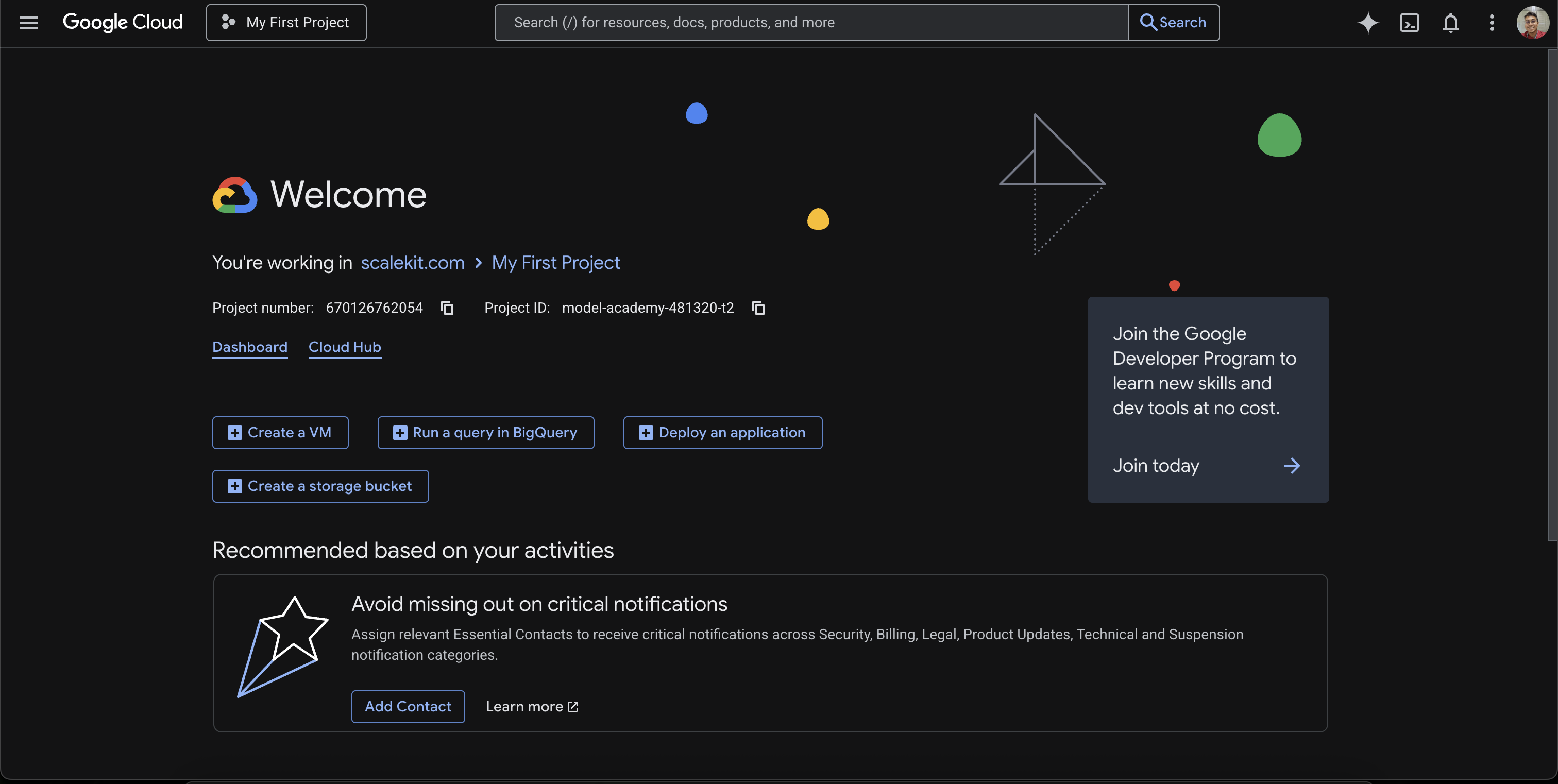
Go to the Google Cloud Console and select your project (or create a new one).
-
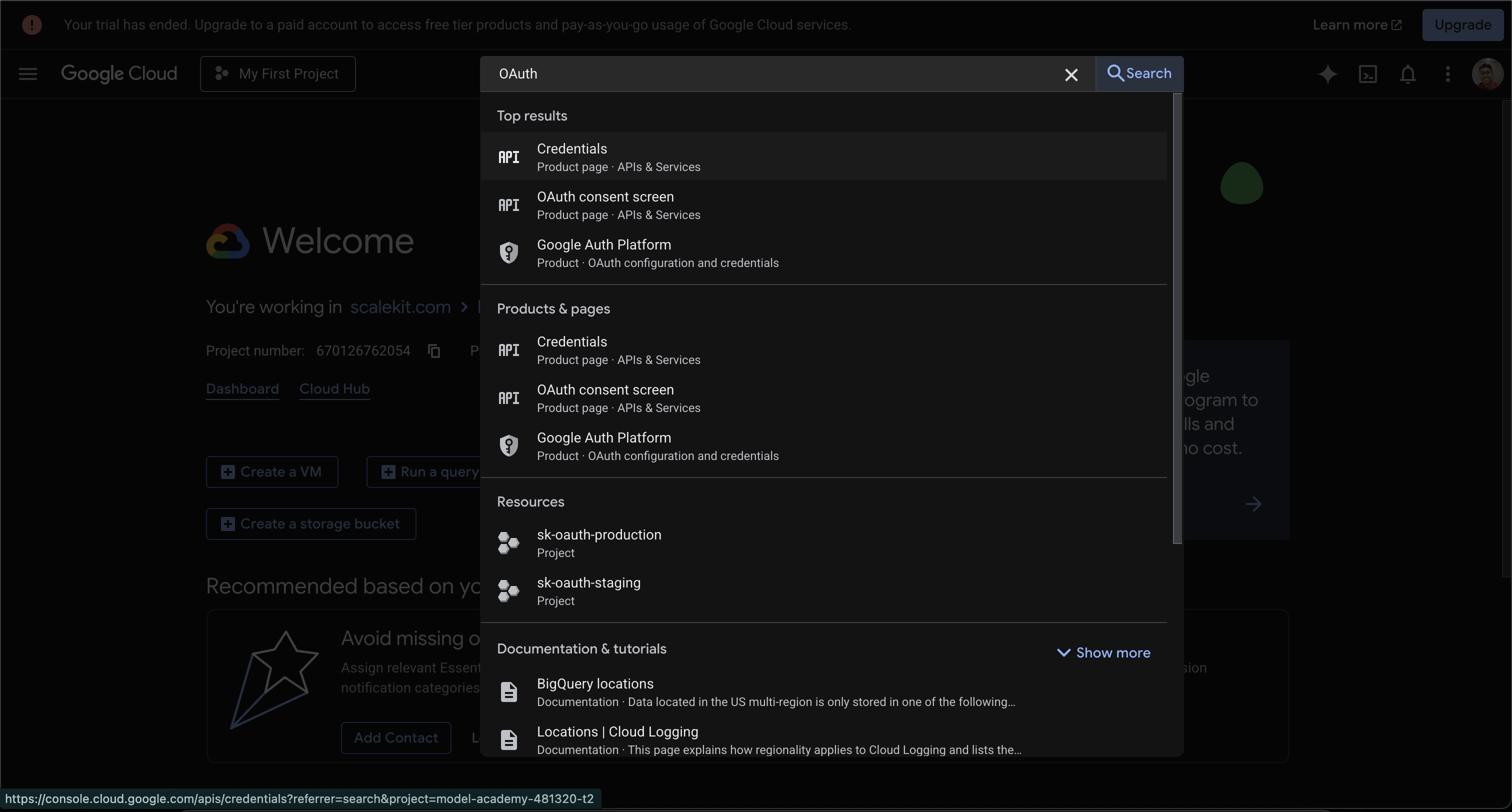
Search for OAuth in the top search bar. Select Credentials under APIs & Services.
-
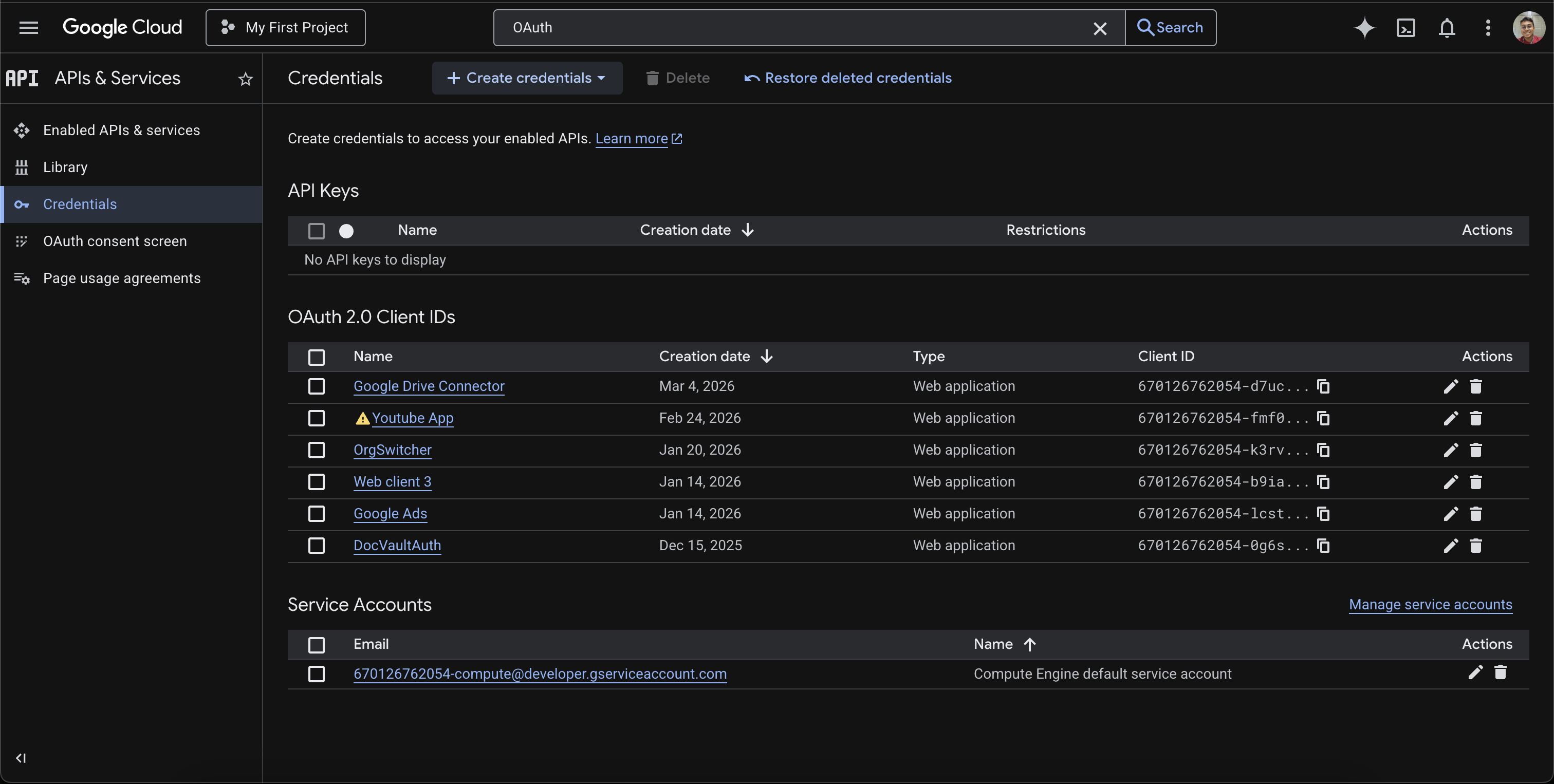
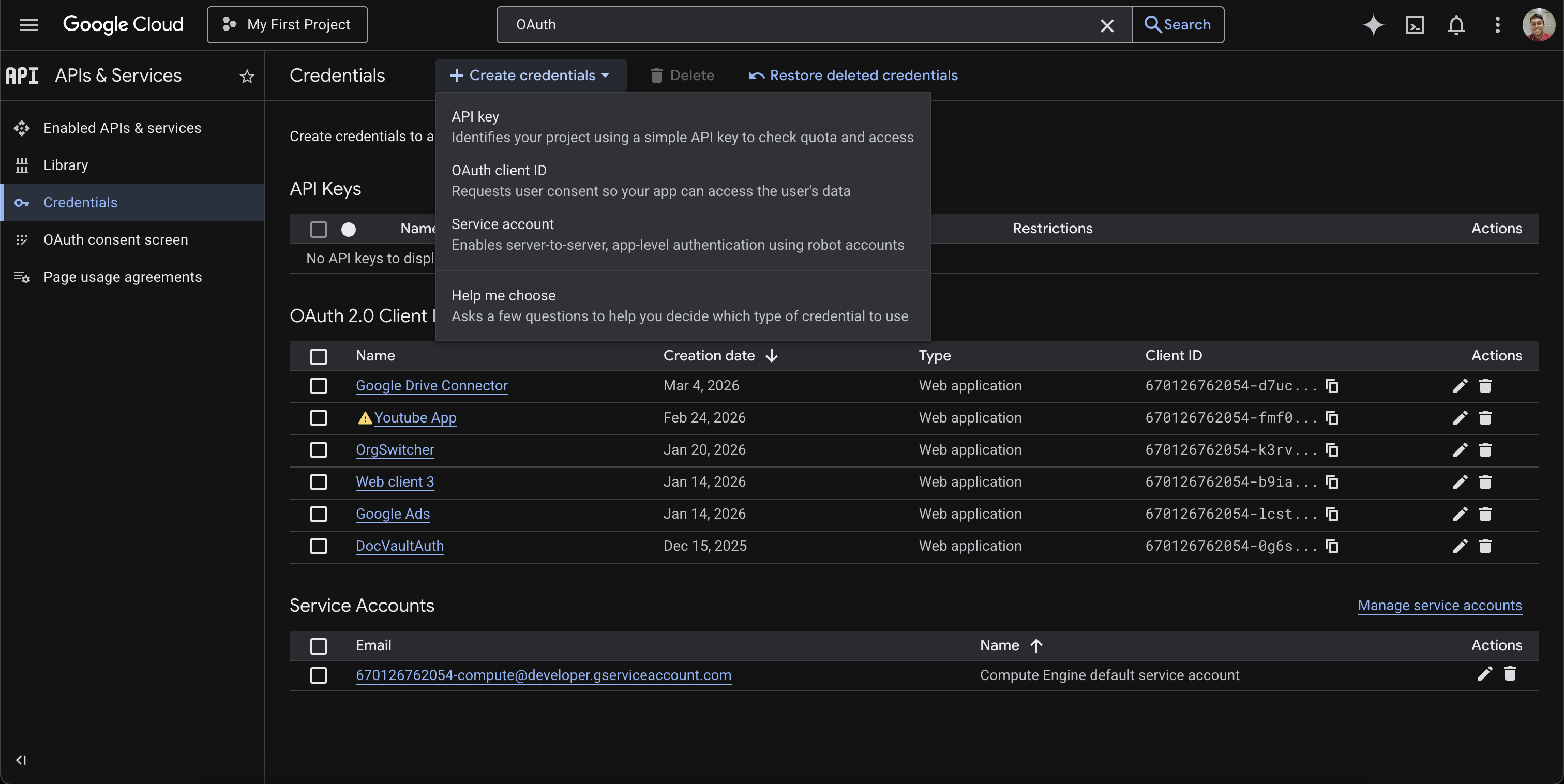
On the Credentials page, click + Create credentials and select OAuth client ID.
-
Set the Application type to Web application and enter a Name (e.g.,
Scalekit).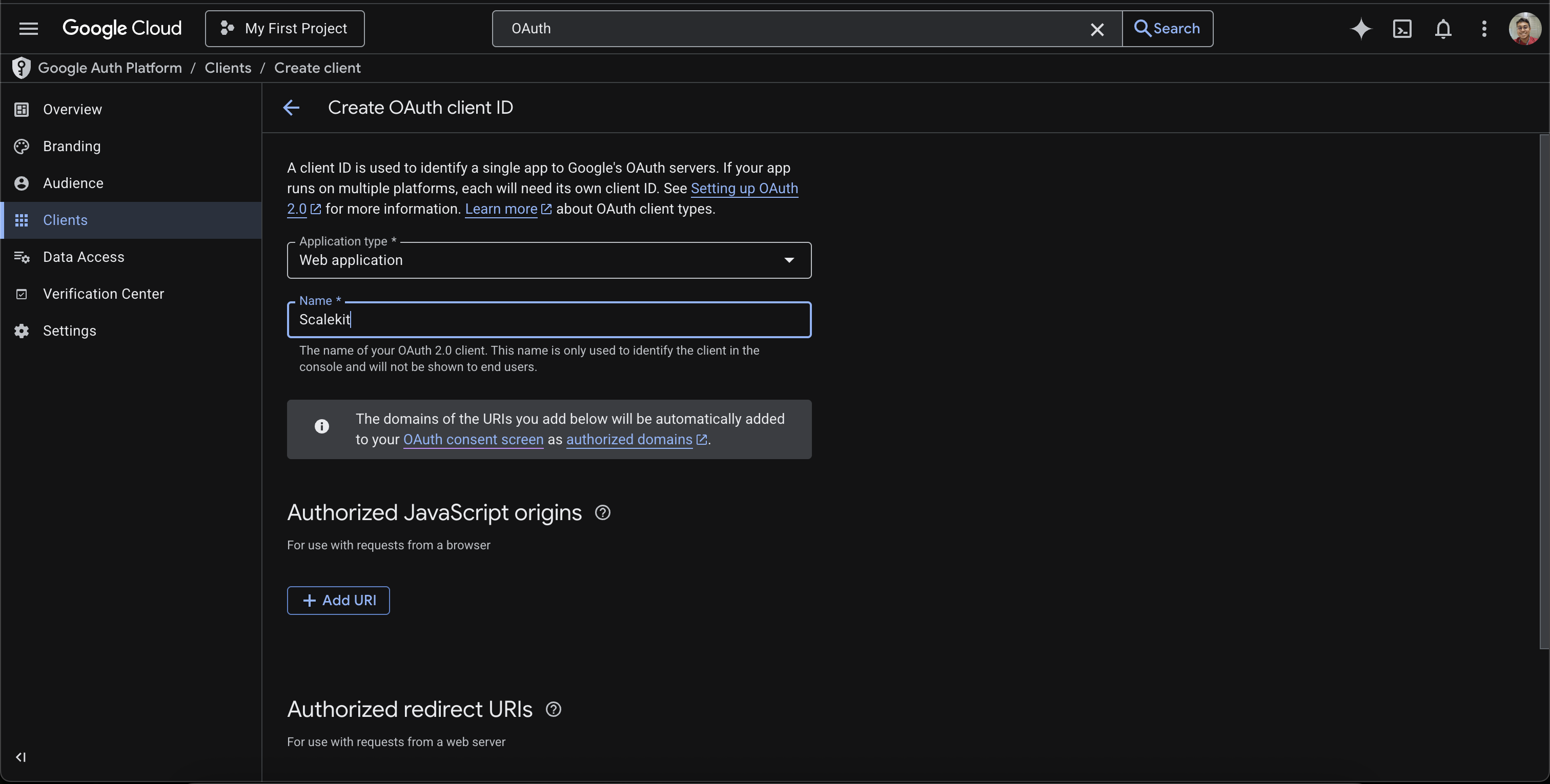
-
Leave the Authorized redirect URIs section empty for now — you’ll add the Scalekit redirect URI in a later step.
-
-
Create a connection in Scalekit
-
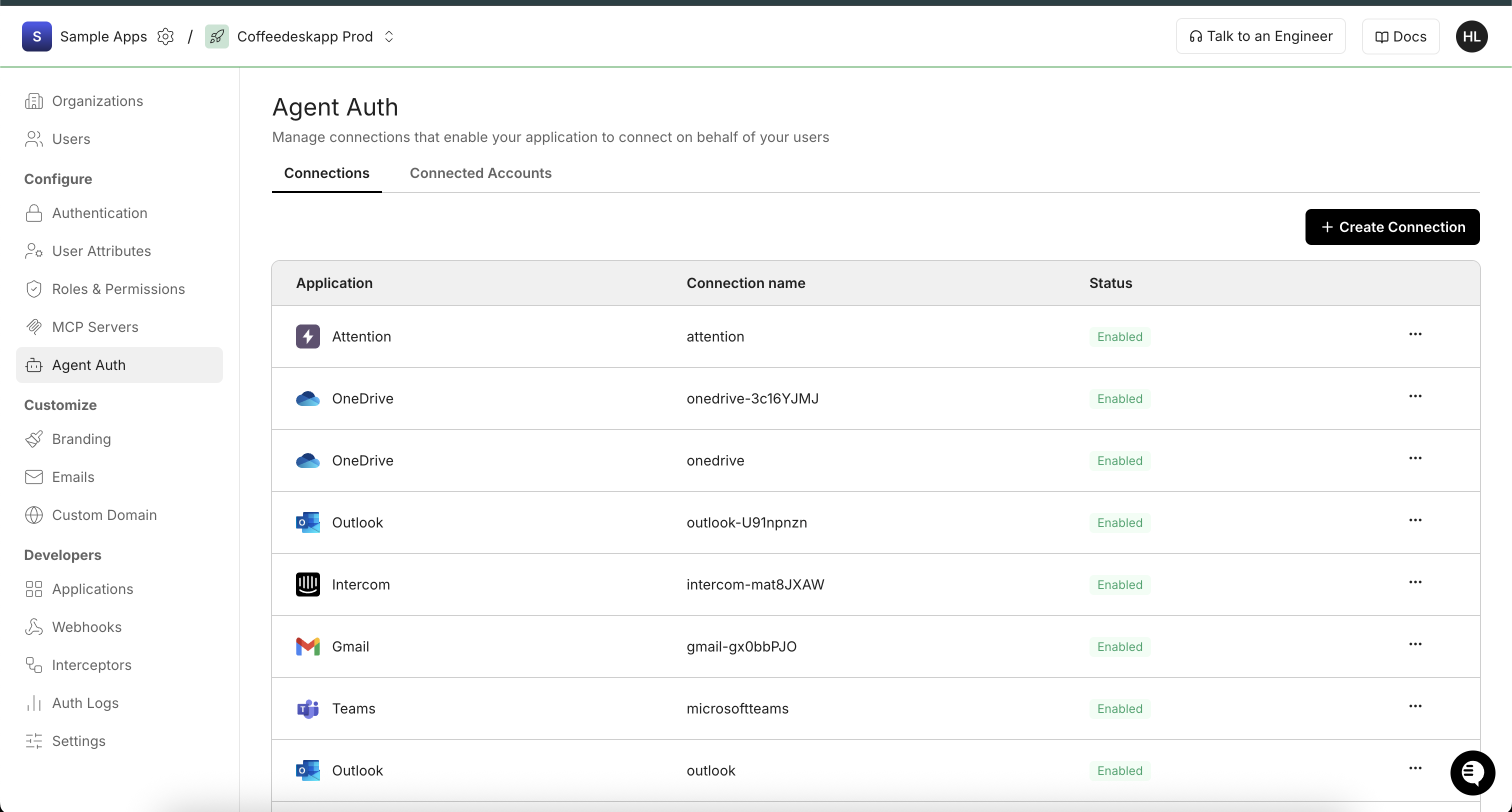
In Scalekit dashboard, go to AgentKit > Connections > Create Connection.
-
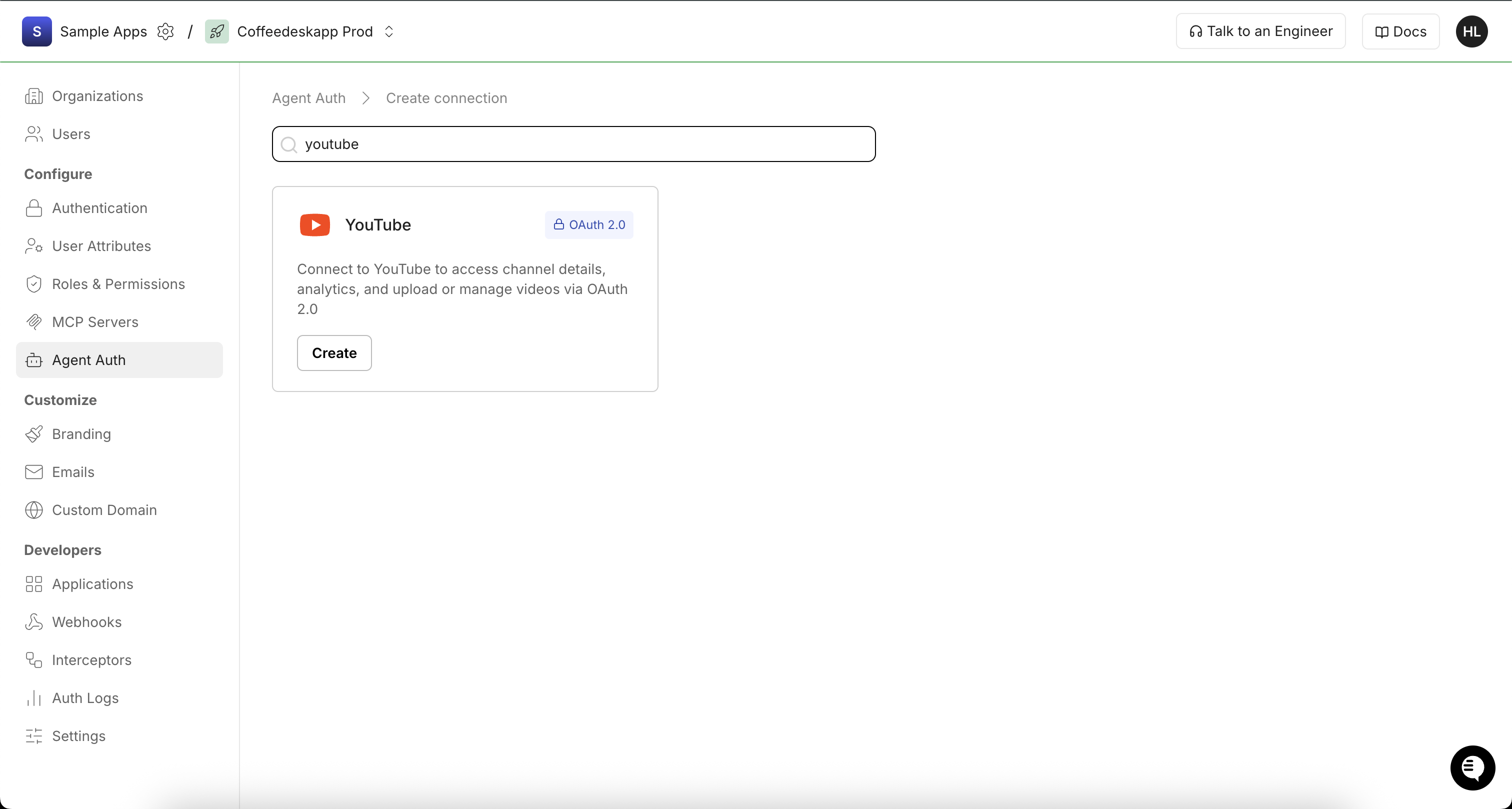
Search for YouTube and click Create.
-
Copy the Redirect URI from the connection configuration panel. It looks like
https://<SCALEKIT_ENVIRONMENT_URL>/sso/v1/oauth/<CONNECTION_ID>/callback.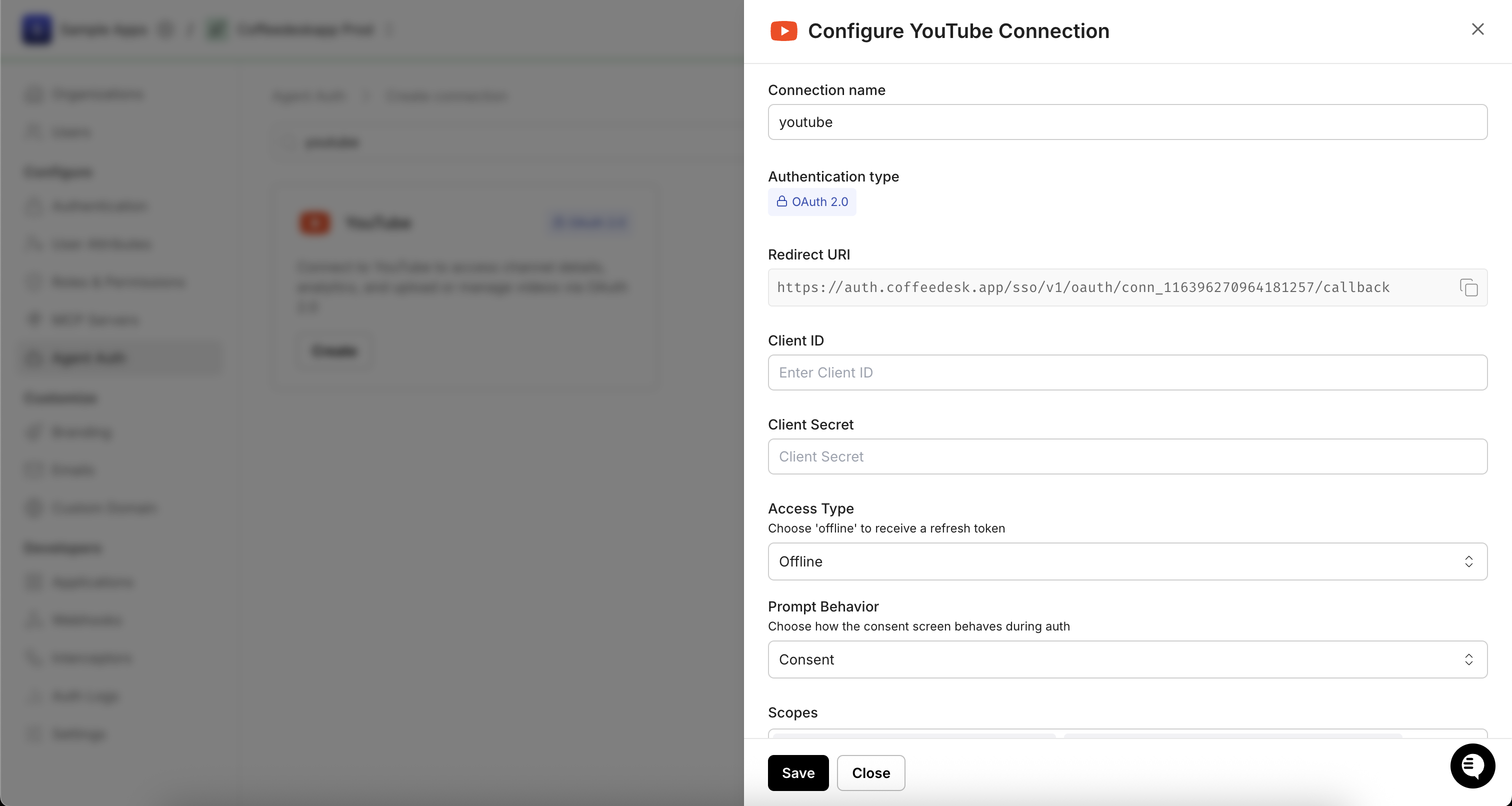
-
-
Configure the redirect URI in Google Cloud
-
Back in the Google Cloud Console, open your OAuth 2.0 client (or continue from step 1).
-
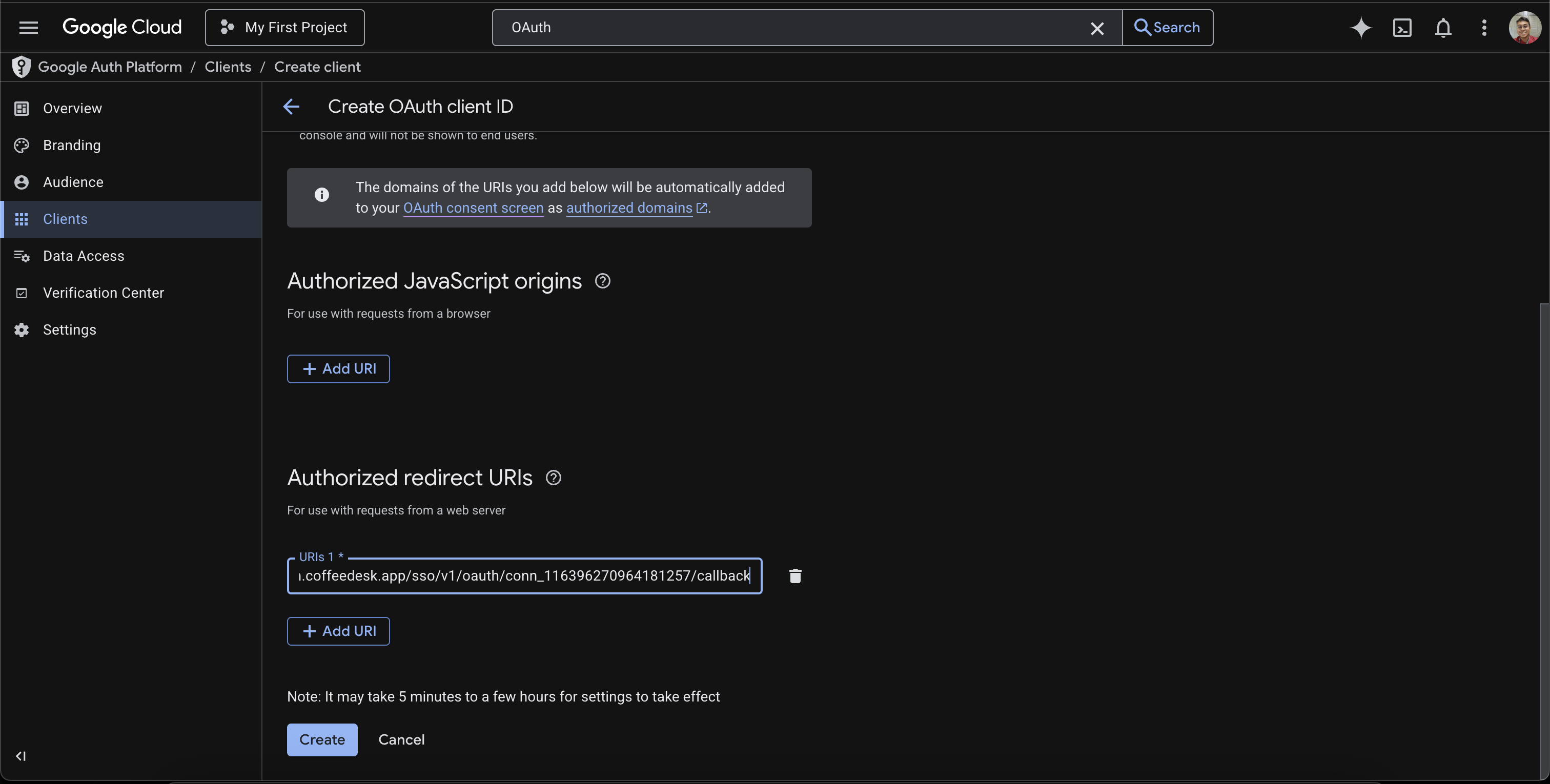
Under Authorized redirect URIs, click + Add URI and paste the Scalekit Redirect URI.
-
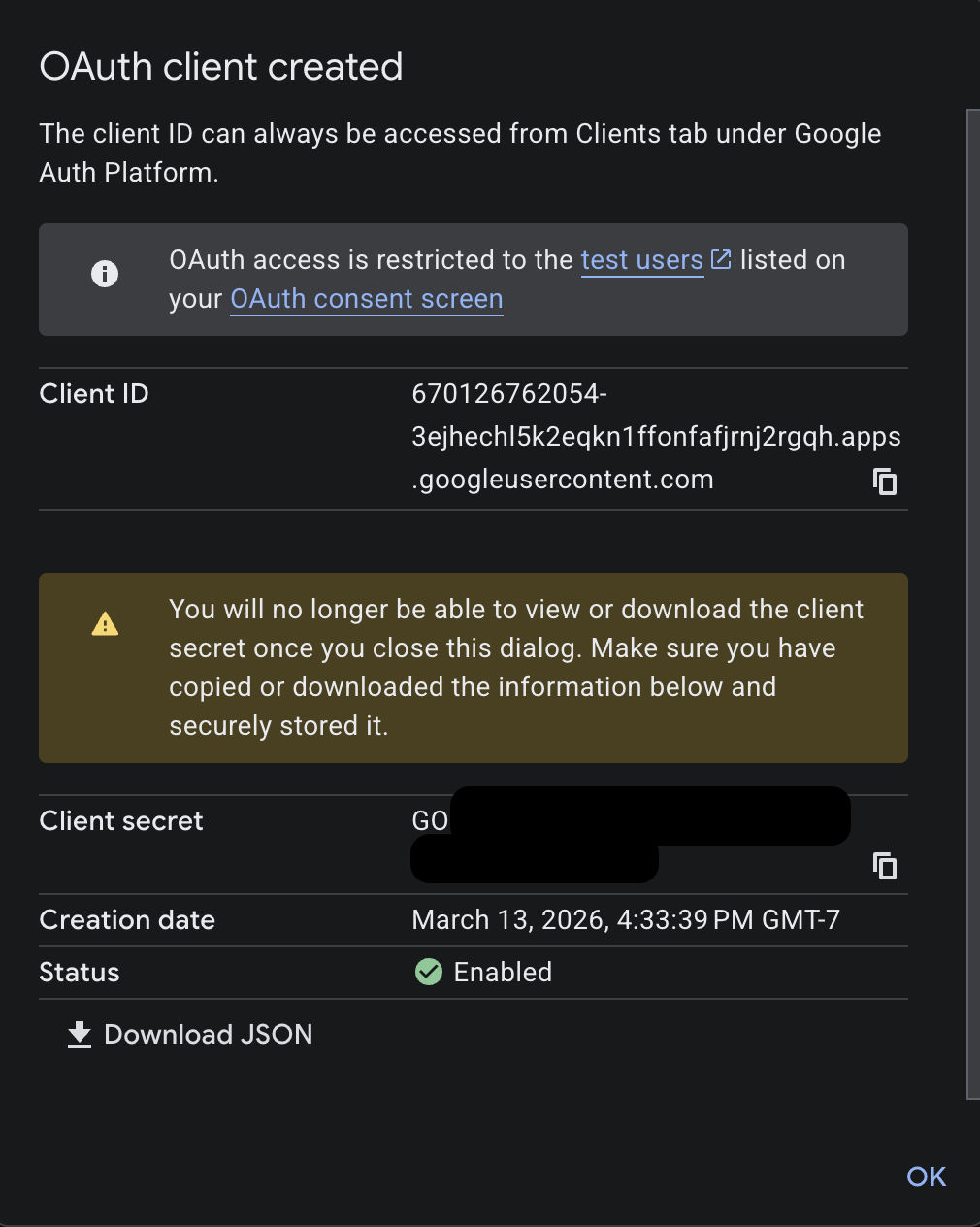
Click Create (or Save if editing an existing client). A dialog displays your Client ID and Client secret. Copy both values.
-
-
Add credentials in Scalekit
-
In Scalekit dashboard, go to AgentKit > Connections and open the YouTube connection you created.
-
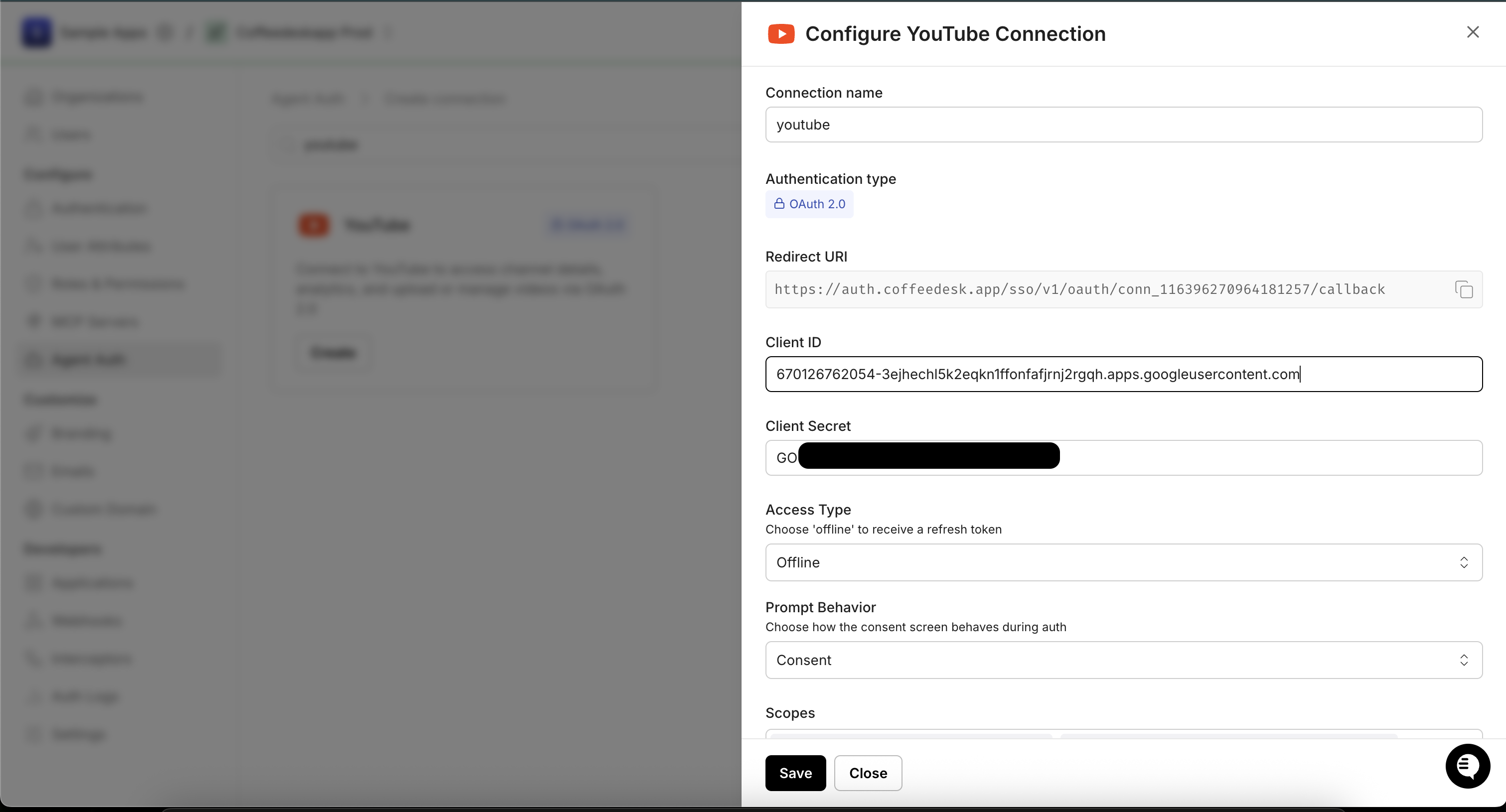
Enter your credentials:
- Client ID — the Client ID from your Google OAuth 2.0 client
- Client Secret — the Client secret from the dialog in step 3
- Scopes — select the scopes your app needs (e.g.,
youtube.readonly,youtube,youtube.force-ssl,yt-analytics.readonly)
-
Click Save.
-
-
-
Authorize and make your first call
Section titled “Authorize and make your first call”quickstart.ts import { ScalekitClient } from '@scalekit-sdk/node'import 'dotenv/config'const scalekit = new ScalekitClient(process.env.SCALEKIT_ENV_URL,process.env.SCALEKIT_CLIENT_ID,process.env.SCALEKIT_CLIENT_SECRET,)const actions = scalekit.actionsconst connector = 'youtube'const identifier = 'user_123'// Generate an authorization link for the userconst { link } = await actions.getAuthorizationLink({ connectionName: connector, identifier })console.log('Authorize YouTube:', link)process.stdout.write('Press Enter after authorizing...')await new Promise(r => process.stdin.once('data', r))// Make your first callconst result = await actions.executeTool({connector,identifier,toolName: 'youtube_analytics_groups_list',toolInput: {},})console.log(result)quickstart.py import osfrom scalekit.client import ScalekitClientfrom dotenv import load_dotenvload_dotenv()scalekit_client = ScalekitClient(env_url=os.getenv("SCALEKIT_ENV_URL"),client_id=os.getenv("SCALEKIT_CLIENT_ID"),client_secret=os.getenv("SCALEKIT_CLIENT_SECRET"),)actions = scalekit_client.actionsconnection_name = "youtube"identifier = "user_123"# Generate an authorization link for the userlink_response = actions.get_authorization_link(connection_name=connection_name,identifier=identifier,)print("Authorize YouTube:", link_response.link)input("Press Enter after authorizing...")# Make your first callresult = actions.execute_tool(tool_input={},tool_name="youtube_analytics_groups_list",connection_name=connection_name,identifier=identifier,)print(result)
What you can do
Section titled “What you can do”Connect this agent connector to let your agent:
- Search records — Search for videos, channels, and playlists on YouTube
- List reporting, analytics groups — List reports that have been generated for a YouTube reporting job
- Query analytics — Query YouTube Analytics data to retrieve metrics like views, watch time, subscribers, revenue, etc
- Update videos, analytics groups, playlist — Update metadata for an existing YouTube video
- Delete subscriptions, reporting jobs, analytics groups — Unsubscribe the authenticated user from a YouTube channel using the subscription ID
- Insert playlist, playlist items, analytics group item — Create a new YouTube playlist for the authenticated user
Common workflows
Section titled “Common workflows”Google OAuth consent screen verification
Before you use your own Google OAuth credentials in production, understand what end users see on Google’s consent screen when they authorize a connected account.
| Audience type | Consent screen behavior | When to use |
|---|---|---|
| Internal | Shows your App Name and logo from Branding settings | Only users in your Google Workspace or Cloud Identity organization can authorize the connector |
| External | Shows {env_name}.scalekit.dev until Google verifies your app | Any user with a Google account can authorize the connector |
Why External is required for most AgentKit connectors:
- Internal restricts authorization to users in your Google Workspace or Cloud Identity organization. Users with
@gmail.comor other Google accounts outside your organization cannot complete OAuth. - External is required when end users outside your organization authorize tool access through connected accounts.
- Organization-managed OAuth clients follow the same rules as personal or developer OAuth clients. Switching to an org-owned client does not bypass Google verification.
- Until Google completes verification of your External app, users see
scalekit.devon the consent screen. After verification, your App Name and logo appear.
During development:
- Add Test users under APIs & Services → OAuth consent screen while publishing status is Testing.
- On unverified apps, users can click Advanced → Go to app (unsafe) to proceed during testing.
- Google Workspace admins may need to allowlist your OAuth client.
For Google’s verification requirements and timeline, refer to Google’s OAuth consent screen verification guide.
Tool list
Section titled “Tool list”Use the exact tool names from the Tool list below when you call execute_tool. If you’re not sure which name to use, list the tools available for the current user first.
youtube_analytics_group_create#Create a YouTube Analytics group to organize videos, playlists, channels, or assets for collective analytics reporting.3 params
Create a YouTube Analytics group to organize videos, playlists, channels, or assets for collective analytics reporting.
item_typestringrequiredType of items the group will containtitlestringrequiredTitle of the analytics groupon_behalf_of_content_ownerstringoptionalContent owner ID. For content partners only.youtube_analytics_group_item_insert#Add a video, playlist, or channel to a YouTube Analytics group.4 params
Add a video, playlist, or channel to a YouTube Analytics group.
group_idstringrequiredID of the Analytics group to add the item toresource_idstringrequiredID of the resource (video ID, channel ID, or playlist ID)resource_kindstringrequiredType of the resourceon_behalf_of_content_ownerstringoptionalContent owner ID. For content partners only.youtube_analytics_group_items_delete#Remove an item (video, channel, or playlist) from a YouTube Analytics group.2 params
Remove an item (video, channel, or playlist) from a YouTube Analytics group.
idstringrequiredID of the group item to removeon_behalf_of_content_ownerstringoptionalContent owner ID on whose behalf the request is being madeyoutube_analytics_group_items_list#Retrieve a list of items (videos, playlists, channels, or assets) that belong to a YouTube Analytics group.2 params
Retrieve a list of items (videos, playlists, channels, or assets) that belong to a YouTube Analytics group.
group_idstringrequiredID of the group whose items to retrieveon_behalf_of_content_ownerstringoptionalContent owner ID on whose behalf the request is being madeyoutube_analytics_groups_delete#Delete a YouTube Analytics group. This removes the group but does not delete the videos, channels, or playlists within it.2 params
Delete a YouTube Analytics group. This removes the group but does not delete the videos, channels, or playlists within it.
group_idstringrequiredID of the Analytics group to deleteon_behalf_of_content_ownerstringoptionalContent owner ID on whose behalf the request is being madeyoutube_analytics_groups_list#Retrieve a list of YouTube Analytics groups for a channel or content owner. Specify either id or mine to filter results.4 params
Retrieve a list of YouTube Analytics groups for a channel or content owner. Specify either id or mine to filter results.
idstringoptionalComma-separated list of group IDs to retrieveminebooleanoptionalIf true, return only groups owned by the authenticated user. Required if id is not set.on_behalf_of_content_ownerstringoptionalContent owner ID on whose behalf the request is being madepage_tokenstringoptionalToken for retrieving the next page of resultsyoutube_analytics_groups_update#Update the title of an existing YouTube Analytics group.3 params
Update the title of an existing YouTube Analytics group.
group_idstringrequiredID of the Analytics group to updatetitlestringrequiredNew title for the Analytics groupon_behalf_of_content_ownerstringoptionalContent owner ID. For content partners only.youtube_analytics_query#Query YouTube Analytics data to retrieve metrics like views, watch time, subscribers, revenue, etc. for channels or content owners.11 params
Query YouTube Analytics data to retrieve metrics like views, watch time, subscribers, revenue, etc. for channels or content owners.
end_datestringrequiredEnd date for the analytics report in YYYY-MM-DD formatidsstringrequiredChannel or content owner ID. Format: channel==CHANNEL_ID or contentOwner==CONTENT_OWNER_IDmetricsstringrequiredComma-separated list of metrics to retrieve (e.g., views,estimatedMinutesWatched,likes,subscribersGained)start_datestringrequiredStart date for the analytics report in YYYY-MM-DD formatcurrencystringoptionalCurrency for monetary metrics (ISO 4217 code, e.g., USD)dimensionsstringoptionalComma-separated list of dimensions to group results by (e.g., day,country,video)filtersstringoptionalFilter expression to narrow results (e.g., country==US, video==VIDEO_ID)include_historical_channel_databooleanoptionalInclude historical channel data recorded before the channel was linked to a content ownermax_resultsintegeroptionalMaximum number of rows to return in the response (maximum value: 200)sortstringoptionalComma-separated list of columns to sort by. Prefix with - for descending order (e.g., -views)start_indexintegeroptional1-based index of the first row to return (for pagination)youtube_captions_list#Retrieve a list of caption tracks for a YouTube video. The part parameter is fixed to 'snippet'. Requires youtube.force-ssl scope.2 params
Retrieve a list of caption tracks for a YouTube video. The part parameter is fixed to 'snippet'. Requires youtube.force-ssl scope.
video_idstringrequiredID of the video to list captions foridstringoptionalComma-separated list of caption track IDs to filter resultsyoutube_channels_list#Retrieve information about one or more YouTube channels including subscriber count, video count, and channel metadata. You must provide exactly one filter: id, mine, for_handle, for_username, or managed_by_me. Requires a valid YouTube OAuth2 connection.8 params
Retrieve information about one or more YouTube channels including subscriber count, video count, and channel metadata. You must provide exactly one filter: id, mine, for_handle, for_username, or managed_by_me. Requires a valid YouTube OAuth2 connection.
partstringrequiredComma-separated list of channel resource parts to include in the responsefor_handlestringoptionalYouTube channel handle to look up (e.g., @MrBeast). Use instead of id, mine, or for_username.for_usernamestringoptionalYouTube username of the channel to look up (legacy). Use instead of id, mine, or for_handle.idstringoptionalComma-separated list of YouTube channel IDs. Use instead of mine, for_handle, or for_username.managed_by_mebooleanoptionalReturn channels managed by the authenticated user (content partners only). Use instead of id, mine, for_handle, or for_username.max_resultsintegeroptionalMaximum number of results to return (0-50, default: 5)minebooleanoptionalReturn the authenticated user's channel. Use instead of id, for_handle, or for_username.page_tokenstringoptionalToken for paginationyoutube_comment_threads_insert#Post a new top-level comment on a YouTube video. Requires youtube.force-ssl scope.2 params
Post a new top-level comment on a YouTube video. Requires youtube.force-ssl scope.
textstringrequiredText of the commentvideo_idstringrequiredID of the video to comment onyoutube_comment_threads_list#Retrieve top-level comment threads for a YouTube video or channel. You must provide exactly one filter: video_id, all_threads_related_to_channel_id, or id. Each thread includes the top-level comment and optionally its replies. Requires a valid YouTube OAuth2 connection.8 params
Retrieve top-level comment threads for a YouTube video or channel. You must provide exactly one filter: video_id, all_threads_related_to_channel_id, or id. Each thread includes the top-level comment and optionally its replies. Requires a valid YouTube OAuth2 connection.
partstringrequiredComma-separated list of comment thread resource parts to includeall_threads_related_to_channel_idstringoptionalReturn all comment threads associated with a specific channel. Use instead of video_id or id.idstringoptionalComma-separated list of comment thread IDs to retrieve. Use instead of video_id or all_threads_related_to_channel_id.max_resultsintegeroptionalMaximum number of comment threads to return (1-100, default: 20)orderstringoptionalSort order for comment threadspage_tokenstringoptionalToken for paginationsearch_termsstringoptionalLimit results to comments containing these search termsvideo_idstringoptionalYouTube video ID to fetch comment threads for. Use instead of all_threads_related_to_channel_id or id.youtube_comments_list#Retrieve a list of replies to a specific YouTube comment thread. You must provide exactly one filter: parent_id or id. The part parameter is fixed to 'snippet'. Requires youtube.readonly scope.5 params
Retrieve a list of replies to a specific YouTube comment thread. You must provide exactly one filter: parent_id or id. The part parameter is fixed to 'snippet'. Requires youtube.readonly scope.
idstringoptionalComma-separated list of comment IDs to retrieve. Use instead of parent_id.max_resultsintegeroptionalMaximum number of replies to return (1-100, default: 20). Cannot be used with id filter.page_tokenstringoptionalToken for pagination to retrieve the next page of replies. Cannot be used with id filter.parent_idstringoptionalID of the comment thread (top-level comment) to list replies for. Use instead of id.text_formatstringoptionalFormat of the comment text in the responseyoutube_playlist_delete#Permanently delete a YouTube playlist. This action cannot be undone. Requires youtube scope.1 param
Permanently delete a YouTube playlist. This action cannot be undone. Requires youtube scope.
playlist_idstringrequiredID of the playlist to deleteyoutube_playlist_insert#Create a new YouTube playlist for the authenticated user. Requires youtube scope.5 params
Create a new YouTube playlist for the authenticated user. Requires youtube scope.
titlestringrequiredPlaylist titledefault_languagestringoptionalDefault language of the playlistdescriptionstringoptionalPlaylist descriptionprivacy_statusstringoptionalPrivacy settingtagsarrayoptionalTags for the playlistyoutube_playlist_items_delete#Remove a video from a YouTube playlist by its playlist item ID. Requires youtube scope.1 param
Remove a video from a YouTube playlist by its playlist item ID. Requires youtube scope.
playlist_item_idstringrequiredID of the playlist item to remove (not the video ID)youtube_playlist_items_insert#Add a video to a YouTube playlist at an optional position. Requires youtube scope.4 params
Add a video to a YouTube playlist at an optional position. Requires youtube scope.
playlist_idstringrequiredPlaylist to add the video tovideo_idstringrequiredYouTube video ID to addnotestringoptionalOptional note for this playlist itempositionintegeroptionalZero-based position in the playlist. Omit to add at end.youtube_playlist_items_list#Retrieve a list of videos in a YouTube playlist. Returns playlist items with video details, positions, and metadata. Requires a valid YouTube OAuth2 connection.5 params
Retrieve a list of videos in a YouTube playlist. Returns playlist items with video details, positions, and metadata. Requires a valid YouTube OAuth2 connection.
partstringrequiredComma-separated list of playlist item resource parts to includeplaylist_idstringrequiredYouTube playlist ID to retrieve items frommax_resultsintegeroptionalMaximum number of playlist items to return (0-50, default: 5)page_tokenstringoptionalToken for pagination to retrieve the next pagevideo_idstringoptionalFilter results to items containing a specific videoyoutube_playlist_update#Update an existing YouTube playlist's title, description, privacy status, or default language. Requires youtube scope.5 params
Update an existing YouTube playlist's title, description, privacy status, or default language. Requires youtube scope.
playlist_idstringrequiredID of the playlist to updatedefault_languagestringoptionalLanguage of the playlistdescriptionstringoptionalNew playlist descriptionprivacy_statusstringoptionalNew privacy settingtitlestringoptionalNew playlist titleyoutube_playlists_list#Retrieve a list of YouTube playlists for a channel or the authenticated user. You must provide exactly one filter: channel_id, id, or mine. Requires a valid YouTube OAuth2 connection.6 params
Retrieve a list of YouTube playlists for a channel or the authenticated user. You must provide exactly one filter: channel_id, id, or mine. Requires a valid YouTube OAuth2 connection.
partstringrequiredComma-separated list of playlist resource parts to includechannel_idstringoptionalReturn playlists for a specific channel. Use instead of id or mine.idstringoptionalComma-separated list of playlist IDs to retrieve. Use instead of channel_id or mine.max_resultsintegeroptionalMaximum number of playlists to return (0-50, default: 5)minebooleanoptionalReturn playlists owned by the authenticated user. Use instead of channel_id or id.page_tokenstringoptionalToken for paginationyoutube_reporting_create_job#Create a YouTube reporting job to schedule daily generation of a specific report type. Once created, YouTube will generate the report daily.3 params
Create a YouTube reporting job to schedule daily generation of a specific report type. Once created, YouTube will generate the report daily.
namestringrequiredHuman-readable name for the reporting jobreport_type_idstringrequiredID of the report type to generate (e.g., channel_basic_a2, channel_demographics_a1)on_behalf_of_content_ownerstringoptionalContent owner ID on whose behalf the job is being createdyoutube_reporting_jobs_delete#Delete a scheduled YouTube Reporting API job. Stopping a job means new reports will no longer be generated.2 params
Delete a scheduled YouTube Reporting API job. Stopping a job means new reports will no longer be generated.
job_idstringrequiredID of the reporting job to deleteon_behalf_of_content_ownerstringoptionalContent owner ID on whose behalf the request is being madeyoutube_reporting_list_jobs#List all YouTube Reporting API jobs scheduled for a channel or content owner.4 params
List all YouTube Reporting API jobs scheduled for a channel or content owner.
include_system_managedbooleanoptionalIf true, include system-managed reporting jobs in the responseon_behalf_of_content_ownerstringoptionalContent owner ID on whose behalf the request is being madepage_sizeintegeroptionalMaximum number of jobs to return per pagepage_tokenstringoptionalToken for retrieving the next page of resultsyoutube_reporting_list_report_types#List all YouTube Reporting API report types available for a channel or content owner (e.g., channel_basic_a2, channel_demographics_a1).4 params
List all YouTube Reporting API report types available for a channel or content owner (e.g., channel_basic_a2, channel_demographics_a1).
include_system_managedbooleanoptionalIf true, include system-managed report types in the responseon_behalf_of_content_ownerstringoptionalContent owner ID on whose behalf the request is being madepage_sizeintegeroptionalMaximum number of report types to return per pagepage_tokenstringoptionalToken for retrieving the next page of resultsyoutube_reporting_list_reports#List reports that have been generated for a YouTube reporting job. Each report is a downloadable CSV file.7 params
List reports that have been generated for a YouTube reporting job. Each report is a downloadable CSV file.
job_idstringrequiredID of the reporting job whose reports to listcreated_afterstringoptionalOnly return reports created after this timestamp (RFC3339 format, e.g., 2024-01-01T00:00:00Z)on_behalf_of_content_ownerstringoptionalContent owner ID on whose behalf the request is being madepage_sizeintegeroptionalMaximum number of reports to return per pagepage_tokenstringoptionalToken for retrieving the next page of resultsstart_time_at_or_afterstringoptionalOnly return reports whose data start time is at or after this timestamp (RFC3339 format)start_time_beforestringoptionalOnly return reports whose data start time is before this timestamp (RFC3339 format)youtube_search#Search for videos, channels, and playlists on YouTube. Returns a list of resources matching the search query. The part parameter is fixed to 'snippet'. Requires a valid YouTube OAuth2 connection.10 params
Search for videos, channels, and playlists on YouTube. Returns a list of resources matching the search query. The part parameter is fixed to 'snippet'. Requires a valid YouTube OAuth2 connection.
channel_idstringoptionalRestrict search results to a specific channelmax_resultsintegeroptionalMaximum number of results to return (0-50, default: 10)orderstringoptionalSort order for search resultspage_tokenstringoptionalToken for pagination to retrieve the next page of resultspublished_afterstringoptionalFilter results to resources published after this date (RFC 3339 format)published_beforestringoptionalFilter results to resources published before this date (RFC 3339 format)qstringoptionalSearch query keywordssafe_searchstringoptionalSafe search filter leveltypestringoptionalRestrict results to a specific resource typevideo_durationstringoptionalFilter videos by duration (only applies when type is 'video')youtube_subscriptions_delete#Unsubscribe the authenticated user from a YouTube channel using the subscription ID. Requires youtube scope.1 param
Unsubscribe the authenticated user from a YouTube channel using the subscription ID. Requires youtube scope.
subscription_idstringrequiredID of the subscription to deleteyoutube_subscriptions_insert#Subscribe the authenticated user to a YouTube channel. Requires youtube scope.1 param
Subscribe the authenticated user to a YouTube channel. Requires youtube scope.
channel_idstringrequiredID of the YouTube channel to subscribe toyoutube_subscriptions_list#Retrieve a list of YouTube channel subscriptions for the authenticated user or a specific channel. You must provide exactly one filter: channel_id, id, mine, my_recent_subscribers, or my_subscribers. Requires a valid YouTube OAuth2 connection with youtube.readonly scope.10 params
Retrieve a list of YouTube channel subscriptions for the authenticated user or a specific channel. You must provide exactly one filter: channel_id, id, mine, my_recent_subscribers, or my_subscribers. Requires a valid YouTube OAuth2 connection with youtube.readonly scope.
partstringrequiredComma-separated list of subscription resource parts to includechannel_idstringoptionalReturn subscriptions for a specific channel. Use instead of id, mine, my_recent_subscribers, or my_subscribers.for_channel_idstringoptionalFilter subscriptions to specific channels (comma-separated channel IDs)idstringoptionalComma-separated list of subscription IDs to retrieve. Use instead of channel_id, mine, my_recent_subscribers, or my_subscribers.max_resultsintegeroptionalMaximum number of subscriptions to return (0-50, default: 5)minebooleanoptionalReturn subscriptions for the authenticated user. Use instead of channel_id, id, my_recent_subscribers, or my_subscribers.my_recent_subscribersbooleanoptionalReturn the authenticated user's recent subscribers. Use instead of channel_id, id, mine, or my_subscribers.my_subscribersbooleanoptionalReturn the authenticated user's subscribers. Use instead of channel_id, id, mine, or my_recent_subscribers.orderstringoptionalSort order for subscriptionspage_tokenstringoptionalToken for paginationyoutube_video_categories_list#Retrieve a list of YouTube video categories available in a given region or by ID. You must provide exactly one filter: id or region_code. The part parameter is fixed to 'snippet'. Useful for setting the category when updating a video. Requires youtube.readonly scope.3 params
Retrieve a list of YouTube video categories available in a given region or by ID. You must provide exactly one filter: id or region_code. The part parameter is fixed to 'snippet'. Useful for setting the category when updating a video. Requires youtube.readonly scope.
hlstringoptionalLanguage for the category names in the response (BCP-47)idstringoptionalComma-separated list of category IDs to retrieve. Use instead of region_code.region_codestringoptionalISO 3166-1 alpha-2 country code to retrieve categories available in that region. Use instead of id.youtube_videos_delete#Permanently delete a YouTube video. This action cannot be undone. Requires youtube scope.1 param
Permanently delete a YouTube video. This action cannot be undone. Requires youtube scope.
video_idstringrequiredID of the video to deleteyoutube_videos_get_rating#Retrieve the authenticated user's rating (like, dislike, or none) for one or more YouTube videos. The part parameter is fixed to 'id'. Requires youtube.readonly scope.1 param
Retrieve the authenticated user's rating (like, dislike, or none) for one or more YouTube videos. The part parameter is fixed to 'id'. Requires youtube.readonly scope.
idstringrequiredComma-separated list of YouTube video IDs to get ratings foryoutube_videos_list#Retrieve detailed information about one or more YouTube videos including statistics, snippet, content details, and status. You must provide exactly one filter: id, chart, or my_rating. Requires a valid YouTube OAuth2 connection.8 params
Retrieve detailed information about one or more YouTube videos including statistics, snippet, content details, and status. You must provide exactly one filter: id, chart, or my_rating. Requires a valid YouTube OAuth2 connection.
partstringrequiredComma-separated list of video resource parts to include in the responsechartstringoptionalRetrieve a chart of the most popular videos. Use instead of id or my_rating.idstringoptionalComma-separated list of YouTube video IDs. Use instead of chart or my_rating.max_resultsintegeroptionalMaximum number of results to return when using chart filter (1-50, default: 5)my_ratingstringoptionalFilter videos by the authenticated user's rating. Use instead of id or chart.page_tokenstringoptionalToken for paginationregion_codestringoptionalISO 3166-1 alpha-2 country code to filter trending videos by regionvideo_category_idstringoptionalFilter most popular videos by category IDyoutube_videos_rate#Like, dislike, or remove a rating from a YouTube video on behalf of the authenticated user. Requires youtube scope with youtube.force-ssl.2 params
Like, dislike, or remove a rating from a YouTube video on behalf of the authenticated user. Requires youtube scope with youtube.force-ssl.
ratingstringrequiredRating to apply to the videovideo_idstringrequiredYouTube video ID to rateyoutube_videos_update#Update metadata for an existing YouTube video. When updating snippet, both title and category_id are required together. Requires youtube scope.10 params
Update metadata for an existing YouTube video. When updating snippet, both title and category_id are required together. Requires youtube scope.
video_idstringrequiredID of the video to updatecategory_idstringoptionalYouTube video category ID. Required together with title when updating snippet.default_languagestringoptionalLanguage of the videodescriptionstringoptionalNew video descriptionembeddablebooleanoptionalWhether the video can be embeddedlicensestringoptionalVideo licenseprivacy_statusstringoptionalNew privacy settingpublic_stats_viewablebooleanoptionalWhether stats are publicly visibletagsarrayoptionalVideo tagstitlestringoptionalNew video title. Required together with category_id when updating snippet.