


Datadog connector
API KeyDeveloper ToolsMonitoringConnect to Datadog to monitor metrics, logs, traces, dashboards, monitors, incidents, SLOs, synthetics, and security signals across your infrastructure.
Datadog connector
-
Install the SDK
Section titled “Install the SDK”Terminal window npm install @scalekit-sdk/nodeTerminal window pip install scalekit -
Set your credentials
Section titled “Set your credentials”Add your Scalekit credentials to your
.envfile. Find values in app.scalekit.com > Developers > API Credentials..env SCALEKIT_ENVIRONMENT_URL=<your-environment-url>SCALEKIT_CLIENT_ID=<your-client-id>SCALEKIT_CLIENT_SECRET=<your-client-secret> -
Set up the connector
Section titled “Set up the connector”Register your Datadog credentials with Scalekit so it can authenticate requests on your behalf. You do this once per environment.
Dashboard setup steps
Register your Datadog API credentials with Scalekit so Scalekit can proxy API requests and inject your keys automatically. Datadog uses API key authentication — there is no redirect URI or OAuth flow.
-
Find your Datadog site
Datadog hosts accounts on regional sites. You must provide your site when creating a connected account — Scalekit uses it to route API calls to the correct endpoint.
Site identifier Region datadoghq.comUS1 (default) us3.datadoghq.comUS3 us5.datadoghq.comUS5 datadoghq.euEU1 ap1.datadoghq.comAP1 ddog-gov.comUS1-FED (GovCloud) If you are unsure which site your account uses, check the URL when you sign in to Datadog — for example,
app.datadoghq.eumeans your site isdatadoghq.eu. See the Datadog site documentation for details. -
Get your Datadog API key and Application key
- Sign in to Datadog and go to Organization Settings → API Keys.
- Copy an existing API key or click + New Key to create one dedicated to this integration.
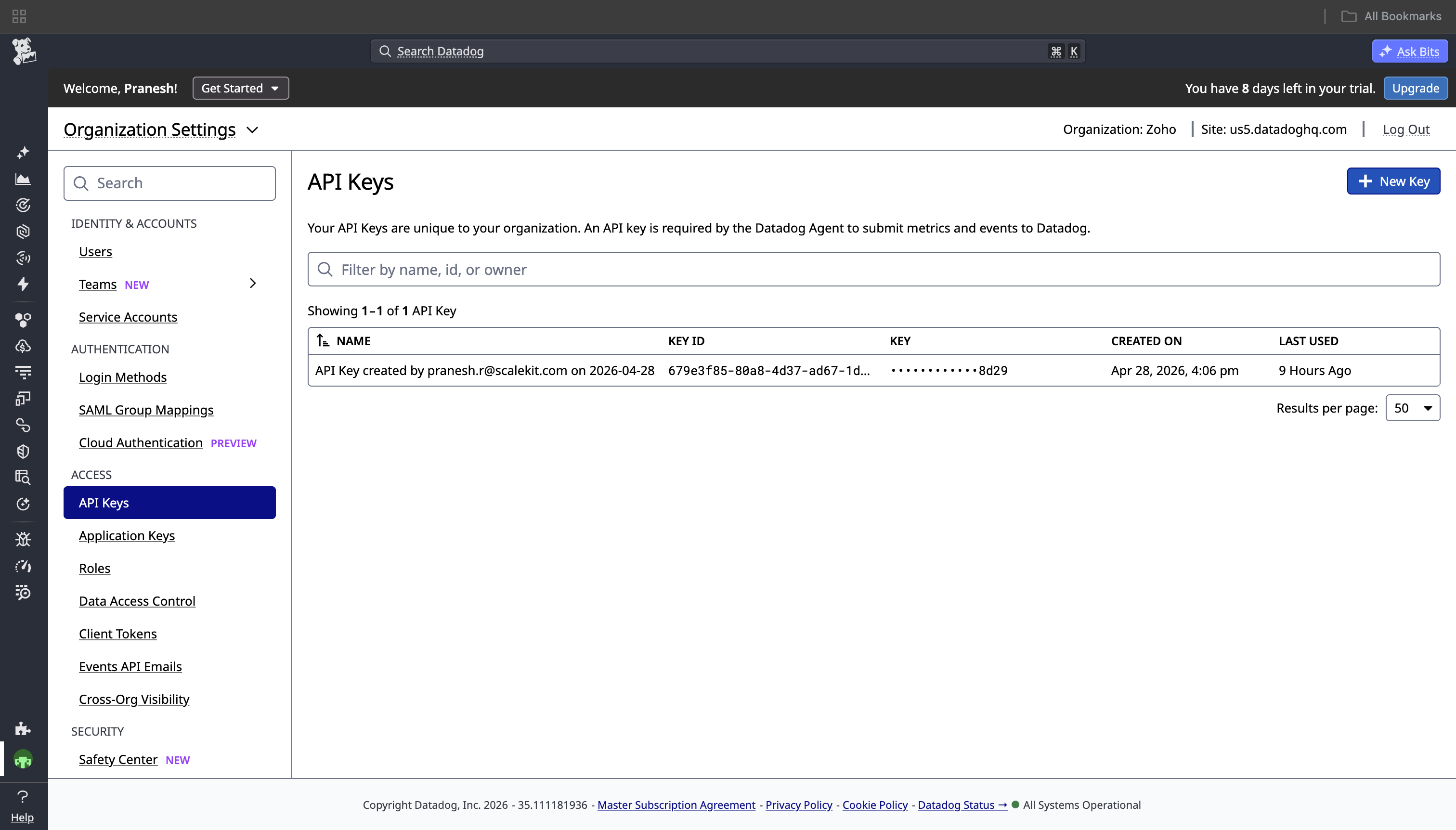
- Go to Organization Settings → Application Keys.
- Copy an existing Application key or click + New Key to create a dedicated one. Copy the key value immediately — Datadog will not show it again.
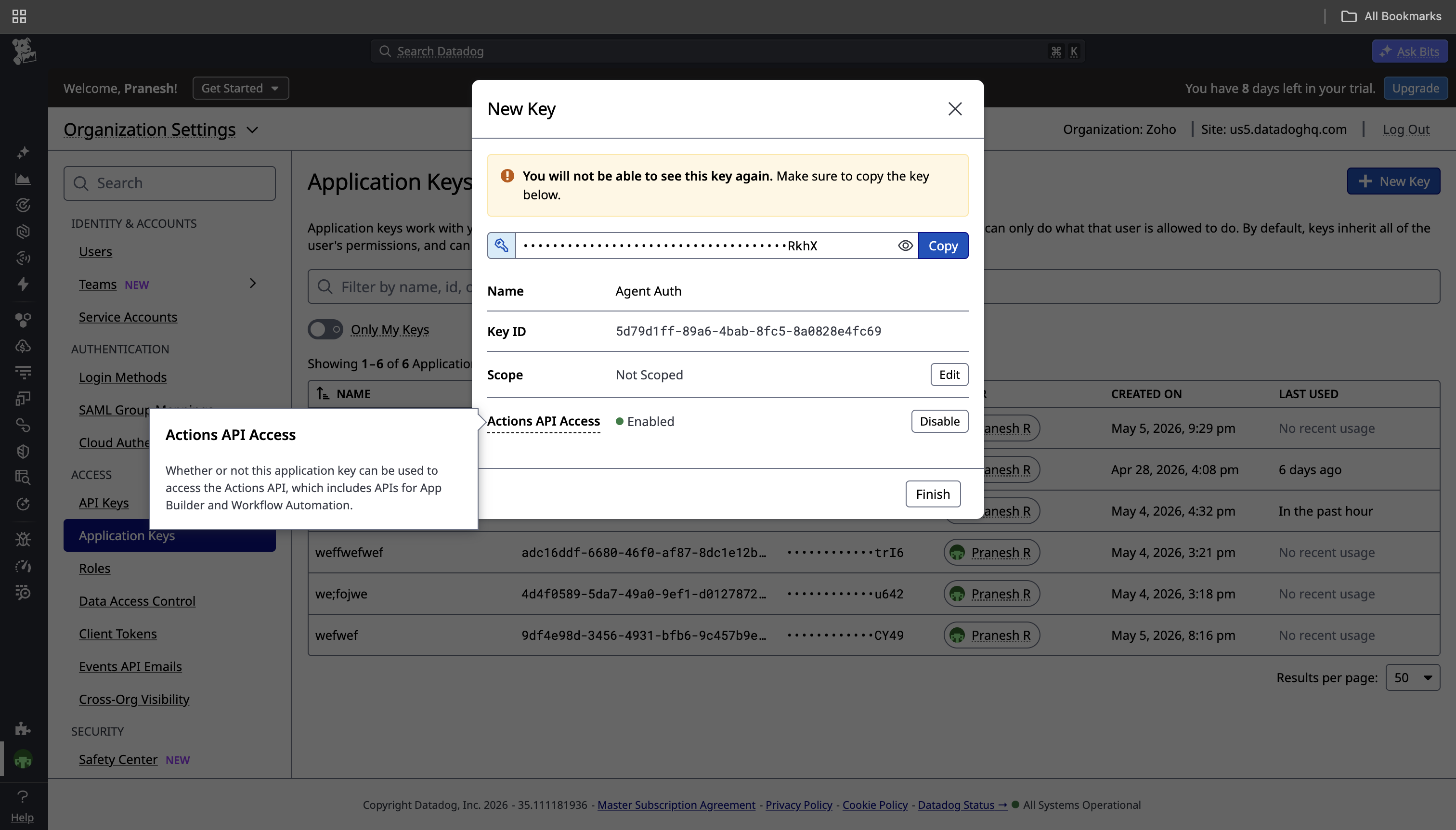
-
Create a connection in Scalekit
- In Scalekit dashboard, go to AgentKit → Connections → Create Connection. Find Datadog and click Create.
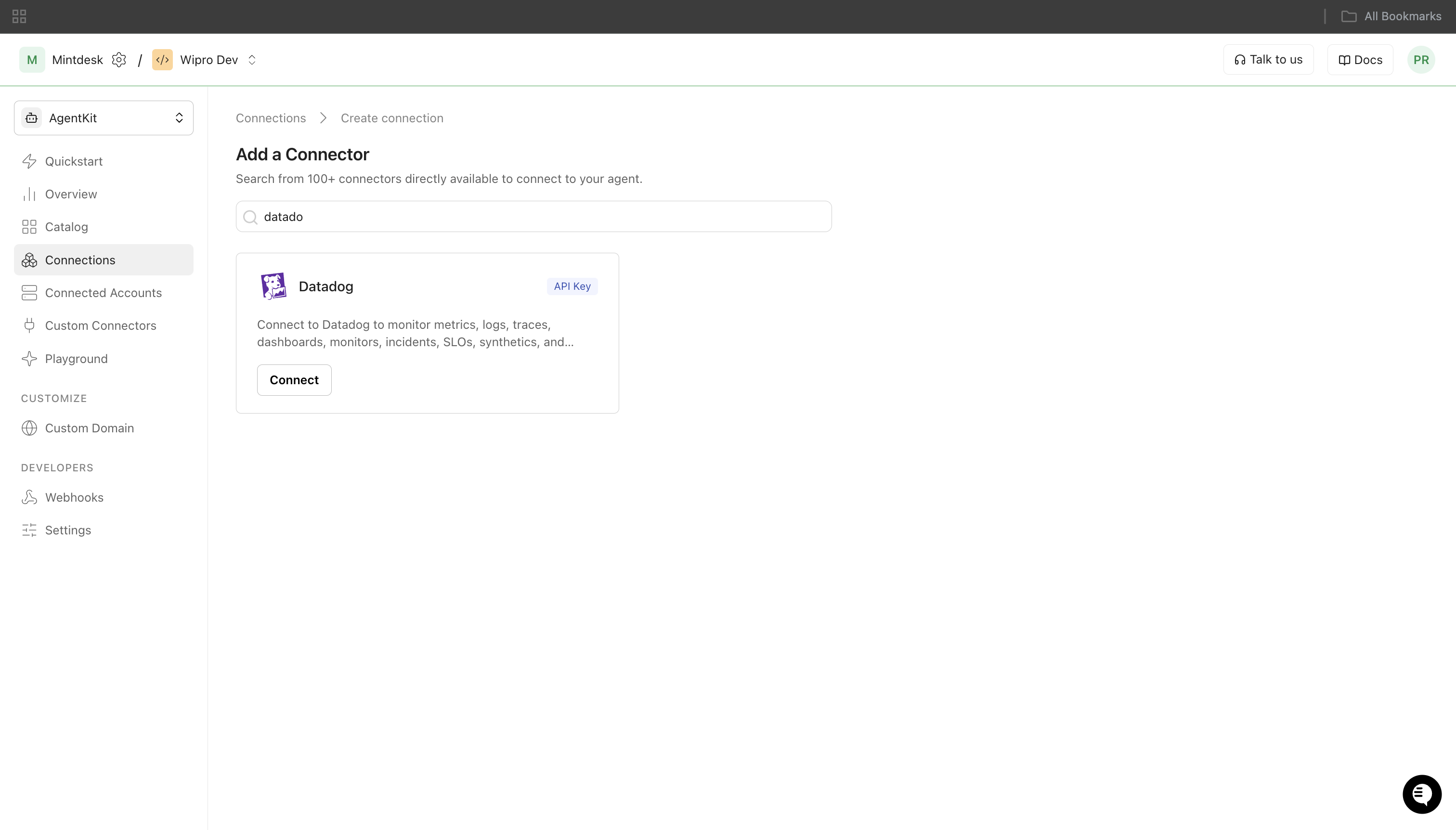
- Note the Connection name — you will use this as
connection_namein your code (e.g.,datadog). - Click Save.
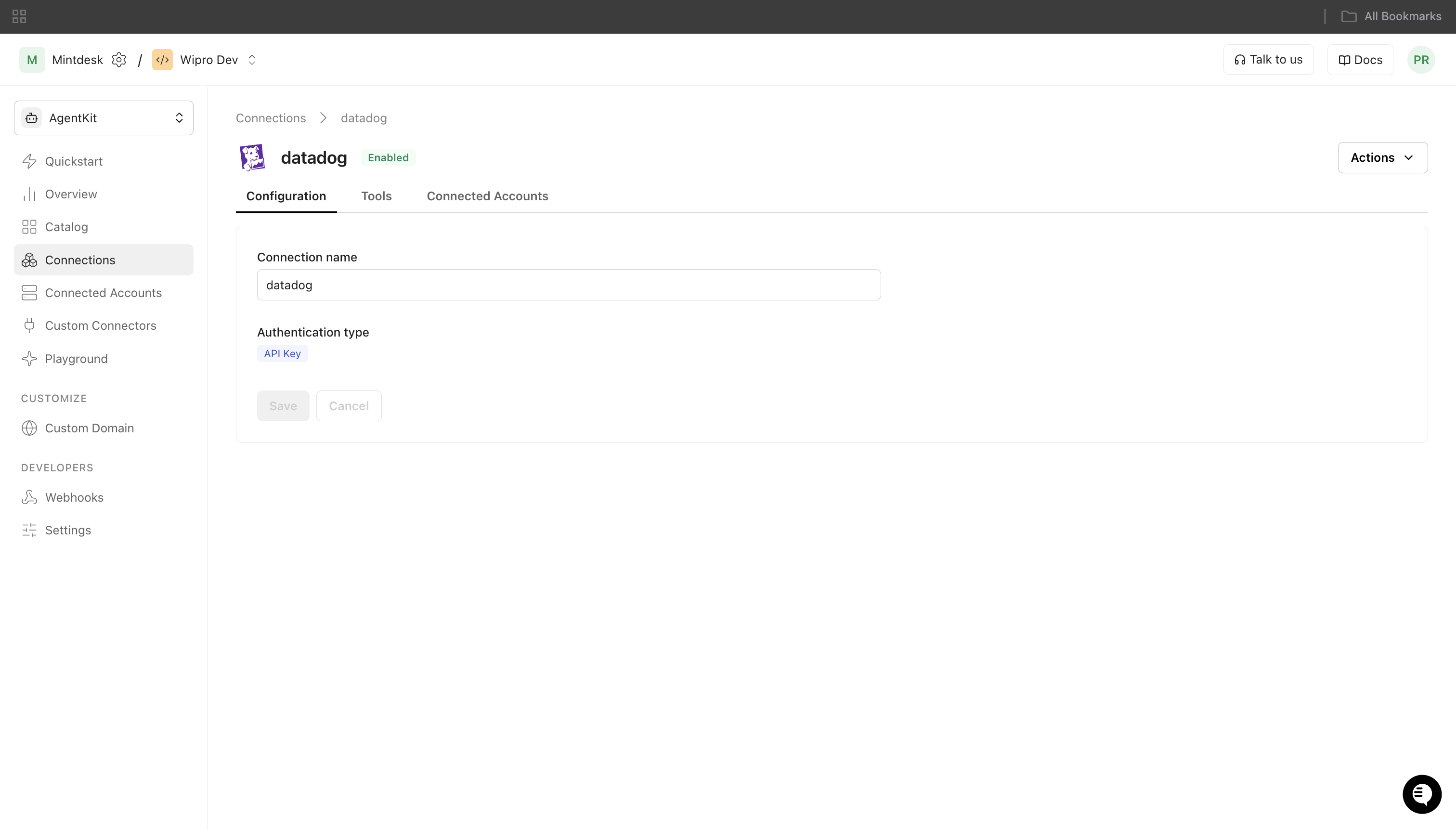
-
Add a connected account
Connected accounts link a specific user identifier in your system to a set of Datadog credentials. Add them via the dashboard for testing, or via the Scalekit API in production.
Via dashboard (for testing)
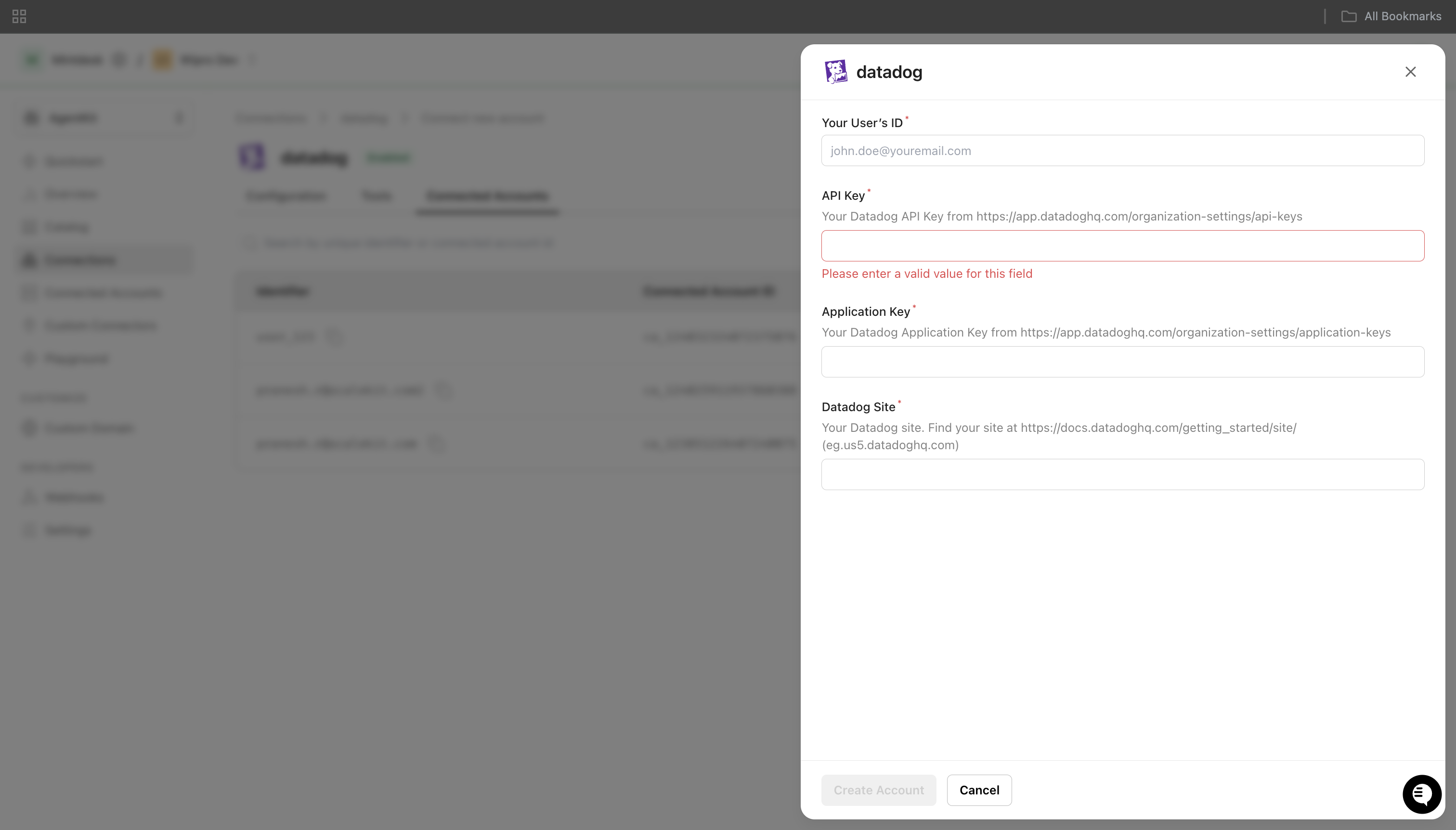
- Open the connection you created and click the Connected Accounts tab → Add account.
- Fill in:
- Your User’s ID — a unique identifier for this user in your system (e.g.,
user_123) - API Key — the Datadog API key from step 2
- Application Key — the Datadog Application key from step 2
- Datadog Site — your site identifier from step 1 (e.g.,
datadoghq.com)
- Your User’s ID — a unique identifier for this user in your system (e.g.,
- Click Create Account.
Via API (for production)
import { Scalekit } from '@scalekit-sdk/node';const scalekit = new Scalekit(process.env.SCALEKIT_ENV_URL,process.env.SCALEKIT_CLIENT_ID,process.env.SCALEKIT_CLIENT_SECRET,);// Never hard-code credentials — read from secure storage or user inputconst datadogApiKey = getUserDatadogApiKey(); // retrieve from your secure storeconst datadogAppKey = getUserDatadogAppKey();const datadogSite = getUserDatadogSite(); // e.g. 'datadoghq.com'await scalekit.actions.upsertConnectedAccount({connectionName: 'datadog',identifier: 'user_123',credentials: {api_key: datadogApiKey,app_key: datadogAppKey,dd_site: datadogSite,},});import osfrom scalekit import ScalekitClientscalekit_client = ScalekitClient(env_url=os.environ["SCALEKIT_ENV_URL"],client_id=os.environ["SCALEKIT_CLIENT_ID"],client_secret=os.environ["SCALEKIT_CLIENT_SECRET"],)# Never hard-code credentials — read from secure storage or user inputdatadog_api_key = get_user_datadog_api_key() # retrieve from your secure storedatadog_app_key = get_user_datadog_app_key()datadog_site = get_user_datadog_site() # e.g. 'datadoghq.com'scalekit_client.actions.upsert_connected_account(connection_name="datadog",identifier="user_123",credentials={"api_key": datadog_api_key,"app_key": datadog_app_key,"dd_site": datadog_site,})
-
-
Make your first call
Section titled “Make your first call”quickstart.ts import { ScalekitClient } from '@scalekit-sdk/node'import 'dotenv/config'const scalekit = new ScalekitClient(process.env.SCALEKIT_ENV_URL,process.env.SCALEKIT_CLIENT_ID,process.env.SCALEKIT_CLIENT_SECRET,)const actions = scalekit.actionsconst connector = 'datadog'const identifier = 'user_123'// Make your first callconst result = await actions.executeTool({connector,identifier,toolName: 'datadog_containers_list',toolInput: {},})console.log(result)quickstart.py import osfrom scalekit.client import ScalekitClientfrom dotenv import load_dotenvload_dotenv()scalekit_client = ScalekitClient(env_url=os.getenv("SCALEKIT_ENV_URL"),client_id=os.getenv("SCALEKIT_CLIENT_ID"),client_secret=os.getenv("SCALEKIT_CLIENT_SECRET"),)actions = scalekit_client.actionsconnection_name = "datadog"identifier = "user_123"# Make your first callresult = actions.execute_tool(tool_input={},tool_name="datadog_containers_list",connection_name=connection_name,identifier=identifier,)print(result)
What you can do
Section titled “What you can do”Connect this agent connector to let your agent:
- Get synthetics browser test, monitor, event — Get a specific Datadog Synthetics browser test by public ID
- Create downtime, monitor, host tags — Create a new Datadog downtime to suppress alerts
- Trigger synthetics test — Trigger one or more Datadog Synthetics tests to run immediately
- Delete notebook, synthetics test, dashboard — Delete a specific notebook by its ID
- List processes, log indexes, permissions — List live processes running on your infrastructure
- Update slo, downtime, metric metadata — Update an existing Datadog Service Level Objective
Common workflows
Section titled “Common workflows”Proxy API call
const result = await actions.request({ connectionName: 'datadog', identifier: 'user_123', path: '/api/v1/monitor', method: 'GET',});console.log(result);result = actions.request( connection_name='datadog', identifier='user_123', path="/api/v1/monitor", method="GET")print(result)Create a monitor
const monitor = await actions.executeTool({ connector: 'datadog', identifier: 'user_123', toolName: 'datadog_monitor_create', toolInput: { name: 'High CPU Usage', type: 'metric alert', query: 'avg(last_5m):avg:system.cpu.user{*} > 90', message: 'CPU usage is high on {{host.name}}. @slack-alerts', },});console.log('Monitor created:', monitor.id);monitor = actions.execute_tool( connection_name='datadog', identifier='user_123', tool_name="datadog_monitor_create", tool_input={ "name": "High CPU Usage", "type": "metric alert", "query": "avg(last_5m):avg:system.cpu.user{*} > 90", "message": "CPU usage is high on {{host.name}}. @slack-alerts", },)print("Monitor created:", monitor["id"])Search logs
const logs = await actions.executeTool({ connector: 'datadog', identifier: 'user_123', toolName: 'datadog_logs_search', toolInput: { query: 'service:web status:error', from: '2024-01-01T00:00:00Z', to: '2024-01-02T00:00:00Z', limit: 50, },});console.log('Log count:', logs.data?.length);logs = actions.execute_tool( connection_name='datadog', identifier='user_123', tool_name="datadog_logs_search", tool_input={ "query": "service:web status:error", "from": "2024-01-01T00:00:00Z", "to": "2024-01-02T00:00:00Z", "limit": 50, },)print("Log count:", len(logs.get("data", [])))Query metrics
const metrics = await actions.executeTool({ connector: 'datadog', identifier: 'user_123', toolName: 'datadog_metrics_query', toolInput: { query: 'avg:system.cpu.user{*}', from: 1704067200, // Unix timestamp to: 1704153600, },});console.log('Series:', metrics.series);metrics = actions.execute_tool( connection_name='datadog', identifier='user_123', tool_name="datadog_metrics_query", tool_input={ "query": "avg:system.cpu.user{*}", "from": 1704067200, "to": 1704153600, },)print("Series:", metrics.get("series"))Create an incident
const incident = await actions.executeTool({ connector: 'datadog', identifier: 'user_123', toolName: 'datadog_incident_create', toolInput: { title: 'Database connection failures', customer_impacted: true, severity: 'SEV-2', },});console.log('Incident ID:', incident.data?.id);incident = actions.execute_tool( connection_name='datadog', identifier='user_123', tool_name="datadog_incident_create", tool_input={ "title": "Database connection failures", "customer_impacted": True, "severity": "SEV-2", },)print("Incident ID:", incident.get("data", {}).get("id"))Create a scheduled downtime
The start and end fields use ISO 8601 format, not Unix timestamps.
const downtime = await actions.executeTool({ connector: 'datadog', identifier: 'user_123', toolName: 'datadog_downtime_create', toolInput: { scope: 'env:production', start: '2026-06-01T02:00:00Z', end: '2026-06-01T04:00:00Z', message: 'Scheduled maintenance window', },});// Use data.id (UUID), not included[].id (user UUID)const downtimeId = downtime.data?.id;console.log('Downtime ID:', downtimeId);downtime = actions.execute_tool( connection_name='datadog', identifier='user_123', tool_name="datadog_downtime_create", tool_input={ "scope": "env:production", "start": "2026-06-01T02:00:00Z", "end": "2026-06-01T04:00:00Z", "message": "Scheduled maintenance window", },)# Use data["id"] (UUID), not included[0]["id"] (user UUID)downtime_id = downtime["data"]["id"]print("Downtime ID:", downtime_id)Create a metric SLO
The query field must be a JSON string containing numerator and denominator metric queries. Pass thresholds as a JSON string too.
const slo = await actions.executeTool({ connector: 'datadog', identifier: 'user_123', toolName: 'datadog_slo_create', toolInput: { name: 'API Success Rate', type: 'metric', query: JSON.stringify({ numerator: 'sum:requests.success{*}.as_count()', denominator: 'sum:requests.total{*}.as_count()', }), thresholds: JSON.stringify([{ target: 99.5, timeframe: '30d' }]), },});const sloId = slo.data?.[0]?.id;import json
slo = actions.execute_tool( connection_name='datadog', identifier='user_123', tool_name="datadog_slo_create", tool_input={ "name": "API Success Rate", "type": "metric", "query": json.dumps({ "numerator": "sum:requests.success{*}.as_count()", "denominator": "sum:requests.total{*}.as_count()", }), "thresholds": json.dumps([{"target": 99.5, "timeframe": "30d"}]), },)slo_id = slo["data"][0]["id"]Retrieve an event
Datadog event IDs are 64-bit integers that exceed the float64 precision limit. Always use the id_str field from event_create or events_list_v2 — not the numeric id field — to avoid silent precision loss.
// Create an event and capture its string IDconst created = await actions.executeTool({ connector: 'datadog', identifier: 'user_123', toolName: 'datadog_event_create', toolInput: { title: 'Deployment completed', text: 'v2.3.1 deployed to production', date_happened: Math.floor(Date.now() / 1000), },});const eventId = created.event?.id_str; // use id_str, not id
// Retrieve itconst event = await actions.executeTool({ connector: 'datadog', identifier: 'user_123', toolName: 'datadog_event_get', toolInput: { event_id: eventId },});console.log(event.event?.title);import time
created = actions.execute_tool( connection_name='datadog', identifier='user_123', tool_name="datadog_event_create", tool_input={ "title": "Deployment completed", "text": "v2.3.1 deployed to production", "date_happened": int(time.time()), },)event_id = created["event"]["id_str"] # use id_str, not id
event = actions.execute_tool( connection_name='datadog', identifier='user_123', tool_name="datadog_event_get", tool_input={"event_id": event_id},)print(event["event"]["title"])Submit custom metrics
datadog_metrics_submit takes separate array parameters for timestamps and values — not a serialized series object.
await actions.executeTool({ connector: 'datadog', identifier: 'user_123', toolName: 'datadog_metrics_submit', toolInput: { metric_name: 'app.request.duration', metric_type: 3, // 3 = gauge points_timestamps: JSON.stringify([Math.floor(Date.now() / 1000)]), points_values: JSON.stringify([142.5]), tags: JSON.stringify(['env:production', 'service:api']), },});import time, json
actions.execute_tool( connection_name='datadog', identifier='user_123', tool_name="datadog_metrics_submit", tool_input={ "metric_name": "app.request.duration", "metric_type": 3, # 3 = gauge "points_timestamps": json.dumps([int(time.time())]), "points_values": json.dumps([142.5]), "tags": json.dumps(["env:production", "service:api"]), },)Getting resource IDs
Section titled “Getting resource IDs”Most tools require IDs that must be fetched from the API — never guess or hard-code them.
| Resource | Tool to get ID | Field in response |
|---|---|---|
| Monitor ID | datadog_monitors_list | array[].id |
| Dashboard ID | datadog_dashboards_list | dashboards[].id |
| Downtime ID | datadog_downtime_create response | data.id (UUID — not included[].id) |
| Notebook ID | datadog_notebooks_list | data[].id |
| Incident ID | datadog_incidents_list | data[].id |
| SLO ID | datadog_slos_list | data[].id |
| Role ID | datadog_roles_list | data[].id |
| User ID | datadog_users_list | data[].id |
| RUM App ID | datadog_rum_applications_list | data[].id |
| Event ID | datadog_event_create response | event.id_str (use id_str, not id — see note below) |
| Metric name | datadog_metrics_list | metrics[] (requires from Unix timestamp) |
| Log pipeline ID | datadog_log_pipelines_list | array[].id |
Why event IDs must come from id_str
Datadog event IDs are 64-bit integers (e.g. 8610103547030771722) that exceed the float64 precision limit (~9 × 10¹⁵). When the numeric id field is parsed as a JSON number, it loses precision and the path resolves to a wrong ID, causing a 400 “No event matches” error. Always read event.id_str from the response and pass it as a string to datadog_event_get.
Tool list
Section titled “Tool list”Use the exact tool names from the Tool list below when you call execute_tool. If you’re not sure which name to use, list the tools available for the current user first.
datadog_api_key_validate#Validate the current Datadog API key.0 params
Validate the current Datadog API key.
datadog_audit_logs_search#Search audit log events in Datadog for a given time window.6 params
Search audit log events in Datadog for a given time window.
fromstringrequiredStart of the time window in ISO 8601 format, e.g. 'now-1h' or '2023-01-01T00:00:00Z'.tostringrequiredEnd of the time window in ISO 8601 format, e.g. 'now' or '2023-01-02T00:00:00Z'.cursorstringoptionalPagination cursor from a previous response to fetch the next page.limitintegeroptionalMaximum number of audit events to return (max 1000).querystringoptionalFilter query for the audit log search.sortstringoptionalSort order: 'timestamp' for ascending, '-timestamp' for descending.datadog_containers_list#List all containers running on your infrastructure.3 params
List all containers running on your infrastructure.
filter_tagsstringoptionalFilter containers by tag.page_cursorstringoptionalCursor for pagination to get the next page of results.page_sizeintegeroptionalMaximum number of containers to return per page.datadog_current_user_get#Get the current authenticated Datadog user.0 params
Get the current authenticated Datadog user.
datadog_dashboard_create#Create a new Datadog dashboard.6 params
Create a new Datadog dashboard.
layout_typestringrequiredLayout type for the dashboard (ordered or free).titlestringrequiredTitle of the dashboard.descriptionstringoptionalDescription of the dashboard.tagsstringoptionalJSON array of tags for the dashboard.template_variablesstringoptionalJSON array of template variable objects.widgetsstringoptionalJSON array of widget objects for the dashboard.datadog_dashboard_delete#Delete a Datadog dashboard by ID.1 param
Delete a Datadog dashboard by ID.
dashboard_idstringrequiredID of the dashboard to delete.datadog_dashboard_get#Get a specific Datadog dashboard by ID.1 param
Get a specific Datadog dashboard by ID.
dashboard_idstringrequiredID of the dashboard to retrieve.datadog_dashboard_update#Update an existing Datadog dashboard.5 params
Update an existing Datadog dashboard.
dashboard_idstringrequiredID of the dashboard to update.layout_typestringrequiredLayout type for the dashboard (ordered or free).titlestringrequiredTitle of the dashboard.descriptionstringoptionalDescription of the dashboard.widgetsstringoptionalJSON array of widget objects for the dashboard.datadog_dashboards_list#List all Datadog dashboards.4 params
List all Datadog dashboards.
countintegeroptionalMaximum number of dashboards to return.filter_deletedstringoptionalFilter deleted dashboards (true/false).filter_sharedstringoptionalFilter shared dashboards (true/false).startintegeroptionalStart index for pagination.datadog_downtime_cancel#Cancel a Datadog downtime by ID.1 param
Cancel a Datadog downtime by ID.
downtime_idstringrequiredID of the downtime to cancel.datadog_downtime_create#Create a new Datadog downtime to suppress alerts.7 params
Create a new Datadog downtime to suppress alerts.
scopestringrequiredScope of the downtime, e.g. * or env:prod.endstringoptionalISO-8601 UTC datetime when the downtime ends, e.g. 2026-04-28T12:00:00+00:00.messagestringoptionalMessage to include with the downtime.monitor_idintegeroptionalMonitor ID to apply the downtime to. Omit to apply to all monitors.monitor_tagsstringoptionalJSON array of monitor tags to match for the downtime, e.g. ["*"] for all monitors.startstringoptionalISO-8601 UTC datetime when the downtime starts, e.g. 2026-04-28T10:00:00+00:00.timezonestringoptionalTimezone for the downtime schedule (IANA format).datadog_downtime_get#Get a specific Datadog downtime by ID.1 param
Get a specific Datadog downtime by ID.
downtime_idstringrequiredID of the downtime to retrieve.datadog_downtime_update#Update an existing Datadog downtime.3 params
Update an existing Datadog downtime.
downtime_idstringrequiredID of the downtime to update.messagestringoptionalUpdated message for the downtime.scopestringoptionalUpdated scope of the downtime.datadog_downtimes_list#List all Datadog downtimes.3 params
List all Datadog downtimes.
filter_monitor_idintegeroptionalFilter downtimes by monitor ID.page_limitintegeroptionalNumber of items to return per page.page_offsetintegeroptionalOffset for pagination.datadog_event_create#Create a new event in Datadog.8 params
Create a new event in Datadog.
textstringrequiredBody text of the event.titlestringrequiredTitle of the event.aggregation_keystringoptionalKey to aggregate related events.alert_typestringoptionalAlert type: info, error, warning, success, user_update, recommendation, snapshot.date_happenedintegeroptionalUnix timestamp when the event occurred.hoststringoptionalHost name to associate with the event.prioritystringoptionalPriority of the event: normal or low.tagsstringoptionalJSON array of tags for the event.datadog_event_get#Get a specific Datadog event by ID.1 param
Get a specific Datadog event by ID.
event_idstringrequiredID of the event to retrieve. Use the id_str value from event_create or events_list_v2 to avoid float precision loss.datadog_events_list_v2#List Datadog events using the v2 API with filtering and pagination.6 params
List Datadog events using the v2 API with filtering and pagination.
filter_fromstringoptionalISO 8601 datetime for start of the filter range.filter_querystringoptionalSearch query to filter events.filter_tostringoptionalISO 8601 datetime for end of the filter range.page_cursorstringoptionalCursor for pagination.page_limitintegeroptionalMaximum number of events to return.sortstringoptionalSort order for events (timestamp or asc).datadog_events_query#Query Datadog events within a time range.8 params
Query Datadog events within a time range.
endintegerrequiredUnix timestamp for end of query window.startintegerrequiredUnix timestamp for start of query window.countintegeroptionalMaximum number of events to return.pageintegeroptionalPage number for pagination.prioritystringoptionalPriority filter: normal or low.sourcesstringoptionalComma-separated event sources to filter by.tagsstringoptionalComma-separated tags to filter events by.unaggregatedstringoptionalWhether to return unaggregated events (true/false).datadog_graph_snapshot#Take a snapshot of a metric graph in Datadog.5 params
Take a snapshot of a metric graph in Datadog.
endintegerrequiredEnd of the time window as a Unix timestamp (seconds).metric_querystringrequiredThe Datadog metric query for the graph snapshot.startintegerrequiredStart of the time window as a Unix timestamp (seconds).event_querystringoptionalQuery string to add event bands to the snapshot graph.titlestringoptionalTitle for the snapshot graph.datadog_host_mute#Mute a Datadog host to suppress alerts.4 params
Mute a Datadog host to suppress alerts.
host_namestringrequiredName of the host to mute.endintegeroptionalUnix timestamp when the mute ends.messagestringoptionalMessage describing why the host is being muted.overridestringoptionalWhether to override an existing mute (true/false).datadog_host_tags_create#Add tags to a specific host in Datadog.3 params
Add tags to a specific host in Datadog.
host_namestringrequiredThe hostname to add tags to.tagsstringrequiredJSON array of tag strings to add to the host. E.g. ["env:prod","role:db"].sourcestringoptionalThe source of the tags (optional). Used to filter tags by source.datadog_host_tags_delete#Remove all tags from a specific host in Datadog.2 params
Remove all tags from a specific host in Datadog.
host_namestringrequiredThe hostname to remove all tags from.sourcestringoptionalThe source of the tags to remove (optional).datadog_host_tags_get#Get all tags for a specific host.1 param
Get all tags for a specific host.
host_namestringrequiredThe hostname to retrieve tags for.datadog_host_tags_update#Replace all tags for a specific host in Datadog.3 params
Replace all tags for a specific host in Datadog.
host_namestringrequiredThe hostname whose tags will be replaced.tagsstringrequiredJSON array of tag strings to set on the host. Replaces all existing tags. E.g. ["env:prod","role:db"].sourcestringoptionalThe source of the tags (optional).datadog_host_unmute#Unmute a Datadog host.1 param
Unmute a Datadog host.
host_namestringrequiredName of the host to unmute.datadog_hosts_list#List Datadog hosts with optional filtering and sorting.6 params
List Datadog hosts with optional filtering and sorting.
countintegeroptionalMaximum number of hosts to return.filterstringoptionalFilter string to search hosts.include_muted_hosts_datastringoptionalWhether to include muted hosts data (true/false).sort_dirstringoptionalSort direction: asc or desc.sort_fieldstringoptionalField to sort hosts by.startintegeroptionalStarting offset for pagination.datadog_hosts_totals#Get the total number of active and up Datadog hosts.0 params
Get the total number of active and up Datadog hosts.
datadog_incident_create#Create a new Datadog incident.4 params
Create a new Datadog incident.
customer_impactedstringrequiredWhether customers are impacted (true/false).titlestringrequiredTitle of the incident.severitystringoptionalSeverity level: SEV-1, SEV-2, SEV-3, SEV-4, SEV-5, or UNKNOWN.statestringoptionalInitial state: active, stable, or resolved.datadog_incident_get#Get a specific Datadog incident by ID.1 param
Get a specific Datadog incident by ID.
incident_idstringrequiredID of the incident to retrieve.datadog_incidents_list#List Datadog incidents with optional filtering.4 params
List Datadog incidents with optional filtering.
filterstringoptionalSearch query to filter incidents.page_offsetintegeroptionalOffset for pagination.page_sizeintegeroptionalNumber of incidents per page.sortstringoptionalSort field: created or modified.datadog_ip_ranges_list#Get all IP ranges used by Datadog agents and services.0 params
Get all IP ranges used by Datadog agents and services.
datadog_log_indexes_list#List all Datadog log indexes.0 params
List all Datadog log indexes.
datadog_log_pipeline_get#Get a specific Datadog log processing pipeline by ID.1 param
Get a specific Datadog log processing pipeline by ID.
pipeline_idstringrequiredID of the log pipeline to retrieve.datadog_log_pipelines_list#List all Datadog log processing pipelines.0 params
List all Datadog log processing pipelines.
datadog_logs_aggregate#Aggregate Datadog log events with grouping and compute operations.5 params
Aggregate Datadog log events with grouping and compute operations.
computestringrequiredJSON array of compute objects defining aggregations.fromstringrequiredISO 8601 start time for log aggregation.tostringrequiredISO 8601 end time for log aggregation.group_bystringoptionalJSON array of group_by objects.querystringoptionalLog filter query string.datadog_logs_search#Search and filter Datadog log events.6 params
Search and filter Datadog log events.
fromstringrequiredISO 8601 start time for the log search.tostringrequiredISO 8601 end time for the log search.cursorstringoptionalPagination cursor for fetching next page.limitintegeroptionalMaximum number of log events to return (max 1000).querystringoptionalLog search query string.sortstringoptionalSort order: timestamp (newest first) or asc (oldest first).datadog_metric_metadata_get#Get metadata for a specific Datadog metric.1 param
Get metadata for a specific Datadog metric.
metric_namestringrequiredName of the metric to retrieve metadata for.datadog_metric_metadata_update#Update metadata for a specific Datadog metric.5 params
Update metadata for a specific Datadog metric.
metric_namestringrequiredName of the metric to update metadata for.descriptionstringoptionalDescription of the metric.short_namestringoptionalShort name for the metric.typestringoptionalMetric type: gauge, rate, or count.unitstringoptionalUnit of the metric.datadog_metric_tags_list#List all tags for a specific Datadog metric.1 param
List all tags for a specific Datadog metric.
metric_namestringrequiredName of the metric to list tags for.datadog_metrics_list#List active metrics reported from a given Unix timestamp.3 params
List active metrics reported from a given Unix timestamp.
fromintegerrequiredUnix timestamp from which to start the search.hoststringoptionalHostname to filter the list of metrics to those active on this host.tag_filterstringoptionalFilter metrics by tag.datadog_metrics_query#Query timeseries metric data from Datadog.3 params
Query timeseries metric data from Datadog.
fromintegerrequiredUnix timestamp for start of query window.querystringrequiredDatadog metric query string.tointegerrequiredUnix timestamp for end of query window.datadog_metrics_submit#Submit metric data points to Datadog.6 params
Submit metric data points to Datadog.
metric_namestringrequiredName of the metric to submit.metric_typeintegerrequiredMetric type: 0=unspecified, 1=count, 2=rate, 3=gauge.points_timestampsstringrequiredJSON array of Unix timestamps for the data points.points_valuesstringrequiredJSON array of float values corresponding to each timestamp.hoststringoptionalHost name to associate with the metric.tagsstringoptionalJSON array of tag strings to associate with the metric.datadog_monitor_create#Create a new Datadog monitor.8 params
Create a new Datadog monitor.
namestringrequiredName of the monitor.querystringrequiredThe monitor query string.typestringrequiredType of the monitor (e.g. metric alert, service check, event alert, query alert).messagestringoptionalNotification message for the monitor.no_data_timeframeintegeroptionalNumber of minutes before notifying on missing data.notify_no_datastringoptionalWhether to notify when no data is received (true/false).priorityintegeroptionalMonitor priority from 1 (highest) to 5 (lowest).tagsstringoptionalJSON array of tags to associate with the monitor.datadog_monitor_delete#Delete a Datadog monitor by ID.1 param
Delete a Datadog monitor by ID.
monitor_idintegerrequiredID of the monitor to delete.datadog_monitor_get#Get a specific Datadog monitor by ID.1 param
Get a specific Datadog monitor by ID.
monitor_idintegerrequiredID of the monitor to retrieve.datadog_monitor_mute#Mute a Datadog monitor, optionally with a scope and end time.3 params
Mute a Datadog monitor, optionally with a scope and end time.
monitor_idintegerrequiredID of the monitor to mute.endintegeroptionalUnix timestamp when the mute should end.scopestringoptionalScope to apply the mute to, e.g. role:db.datadog_monitor_search#Search Datadog monitors using a query string.4 params
Search Datadog monitors using a query string.
pageintegeroptionalPage number for pagination.per_pageintegeroptionalNumber of results per page.querystringoptionalSearch query string.sortstringoptionalSort field and direction.datadog_monitor_unmute#Unmute a Datadog monitor.1 param
Unmute a Datadog monitor.
monitor_idintegerrequiredID of the monitor to unmute.datadog_monitor_update#Update an existing Datadog monitor.6 params
Update an existing Datadog monitor.
monitor_idintegerrequiredID of the monitor to update.messagestringoptionalUpdated notification message for the monitor.namestringoptionalNew name for the monitor.priorityintegeroptionalMonitor priority from 1 (highest) to 5 (lowest).querystringoptionalUpdated query string for the monitor.tagsstringoptionalJSON array of tags to associate with the monitor.datadog_monitors_list#List all Datadog monitors with optional filtering.7 params
List all Datadog monitors with optional filtering.
group_statesstringoptionalComma-separated list of group states to filter by (e.g. alert,warn).monitor_tagsstringoptionalComma-separated list of monitor tags.namestringoptionalFilter monitors by name.pageintegeroptionalPage number for pagination.page_sizeintegeroptionalNumber of monitors to return per page.tagsstringoptionalComma-separated list of tags to filter monitors.with_downtimesstringoptionalWhether to include downtime information (true/false).datadog_notebook_create#Create a new notebook in Datadog.2 params
Create a new notebook in Datadog.
namestringrequiredThe name of the notebook.cellsstringoptionalJSON array of notebook cell objects to include in the notebook.datadog_notebook_delete#Delete a specific notebook by its ID.1 param
Delete a specific notebook by its ID.
notebook_idintegerrequiredThe ID of the notebook to delete.datadog_notebook_get#Get a specific Datadog notebook by its ID.1 param
Get a specific Datadog notebook by its ID.
notebook_idintegerrequiredThe ID of the notebook to retrieve.datadog_notebooks_list#List all notebooks available in your Datadog account.5 params
List all notebooks available in your Datadog account.
author_handlestringoptionalFilter notebooks by the author's handle.countintegeroptionalThe number of notebooks to return per page.include_cellsstringoptionalWhether to include notebook cells in the response. Use 'true' or 'false'.querystringoptionalFilter notebooks by a text query string.startintegeroptionalThe offset for pagination (number of notebooks to skip).datadog_permissions_list#List all available Datadog permissions.0 params
List all available Datadog permissions.
datadog_processes_list#List live processes running on your infrastructure.6 params
List live processes running on your infrastructure.
fromintegeroptionalStart of the time window as a Unix timestamp (seconds).page_cursorstringoptionalCursor for pagination to get the next page of results.page_limitintegeroptionalMaximum number of processes to return (max 1000).searchstringoptionalFilter processes by name or command.tagsstringoptionalComma-separated list of tags to filter processes.tointegeroptionalEnd of the time window as a Unix timestamp (seconds).datadog_role_create#Create a new Datadog role.2 params
Create a new Datadog role.
namestringrequiredName for the new role.permissionsstringoptionalJSON array of permission objects to assign to the role.datadog_role_get#Get a specific Datadog role by ID.1 param
Get a specific Datadog role by ID.
role_idstringrequiredUUID of the role to retrieve.datadog_roles_list#List all Datadog roles.4 params
List all Datadog roles.
filterstringoptionalFilter roles by name.page_numberintegeroptionalPage number for pagination.page_sizeintegeroptionalNumber of roles per page.sortstringoptionalField to sort roles by.datadog_rum_application_create#Create a new Datadog RUM application.2 params
Create a new Datadog RUM application.
namestringrequiredName of the RUM application.typestringrequiredType of the RUM application: browser, ios, android, react-native, flutter, or roku.datadog_rum_application_get#Get a specific RUM application by its ID.1 param
Get a specific RUM application by its ID.
idstringrequiredThe ID of the RUM application to retrieve.datadog_rum_applications_list#List all Datadog RUM applications.0 params
List all Datadog RUM applications.
datadog_service_check_submit#Submit a service check result to Datadog.5 params
Submit a service check result to Datadog.
checkstringrequiredThe name of the service check, e.g. 'app.is_ok'.host_namestringrequiredThe hostname associated with this service check.statusintegerrequiredThe status of the service check. 0=OK, 1=WARNING, 2=CRITICAL, 3=UNKNOWN.messagestringoptionalA message describing the current state of the service check.tagsstringoptionalJSON array of tag strings to associate with the service check. E.g. ["env:prod","role:db"].datadog_slo_create#Create a new Service Level Objective (SLO) in Datadog.7 params
Create a new Service Level Objective (SLO) in Datadog.
namestringrequiredName of the SLO.thresholdsstringrequiredJSON array of threshold objects, e.g. [{"timeframe":"7d","target":99.9}].typestringrequiredType of SLO: metric or monitor.descriptionstringoptionalDescription of the SLO.monitor_idsstringoptionalJSON array of monitor IDs for a monitor-based SLO.querystringoptionalJSON object with numerator and denominator for metric-based SLOs.tagsstringoptionalJSON array of tags for the SLO.datadog_slo_delete#Delete a Datadog Service Level Objective by ID.1 param
Delete a Datadog Service Level Objective by ID.
slo_idstringrequiredID of the SLO to delete.datadog_slo_get#Get a specific Datadog Service Level Objective by ID.1 param
Get a specific Datadog Service Level Objective by ID.
slo_idstringrequiredID of the SLO to retrieve.datadog_slo_history#Get historical data for a specific Datadog SLO.4 params
Get historical data for a specific Datadog SLO.
from_tsintegerrequiredUnix timestamp for start of the history range.slo_idstringrequiredID of the SLO.to_tsintegerrequiredUnix timestamp for end of the history range.targetstringoptionalCustom target value for the history calculation.datadog_slo_update#Update an existing Datadog Service Level Objective.7 params
Update an existing Datadog Service Level Objective.
slo_idstringrequiredID of the SLO to update.typestringrequiredType of SLO: metric or monitor. Required by the Datadog API on update.descriptionstringoptionalUpdated description for the SLO.namestringoptionalUpdated name for the SLO.querystringoptionalJSON object with numerator and denominator for metric-type SLOs.tagsstringoptionalJSON array of updated tags.thresholdsstringoptionalJSON array of updated threshold objects.datadog_slos_list#List Service Level Objectives (SLOs) in Datadog.5 params
List Service Level Objectives (SLOs) in Datadog.
idsstringoptionalComma-separated list of SLO IDs to retrieve.limitintegeroptionalMaximum number of SLOs to return.offsetintegeroptionalOffset for pagination.querystringoptionalSearch query to filter SLOs by name.tags_querystringoptionalFilter SLOs by tags.datadog_synthetics_api_test_get#Get a specific Datadog Synthetics API test by public ID.1 param
Get a specific Datadog Synthetics API test by public ID.
public_idstringrequiredPublic ID of the Synthetics API test.datadog_synthetics_browser_test_get#Get a specific Datadog Synthetics browser test by public ID.1 param
Get a specific Datadog Synthetics browser test by public ID.
public_idstringrequiredPublic ID of the Synthetics browser test.datadog_synthetics_global_variables_list#List all Datadog Synthetics global variables.0 params
List all Datadog Synthetics global variables.
datadog_synthetics_locations_list#List all Datadog Synthetics locations (public and private).0 params
List all Datadog Synthetics locations (public and private).
datadog_synthetics_test_delete#Delete one or more Datadog Synthetics tests by public ID.1 param
Delete one or more Datadog Synthetics tests by public ID.
public_idsstringrequiredJSON array of public IDs of Synthetics tests to delete.datadog_synthetics_test_pause_resume#Pause or resume a Datadog Synthetics test.2 params
Pause or resume a Datadog Synthetics test.
new_statusstringrequiredNew status for the test: live or paused.public_idstringrequiredPublic ID of the Synthetics test.datadog_synthetics_test_results_get#Get the latest results for a specific Datadog Synthetics test.3 params
Get the latest results for a specific Datadog Synthetics test.
public_idstringrequiredPublic ID of the Synthetics test.from_tsintegeroptionalUnix timestamp for start of results range.to_tsintegeroptionalUnix timestamp for end of results range.datadog_synthetics_test_trigger#Trigger one or more Datadog Synthetics tests to run immediately.1 param
Trigger one or more Datadog Synthetics tests to run immediately.
testsstringrequiredJSON array of test objects with public_id.datadog_synthetics_tests_list#List all Datadog Synthetics tests.2 params
List all Datadog Synthetics tests.
page_numberintegeroptionalPage number for pagination.page_sizeintegeroptionalNumber of tests to return per page.datadog_user_create#Create a new Datadog user.4 params
Create a new Datadog user.
emailstringrequiredEmail address of the new user.namestringoptionalDisplay name of the user.rolesstringoptionalJSON array of role IDs to assign to the user.titlestringoptionalJob title of the user.datadog_user_disable#Disable a Datadog user account by UUID.1 param
Disable a Datadog user account by UUID.
user_idstringrequiredUUID of the user to disable.datadog_user_get#Get a specific Datadog user by UUID.1 param
Get a specific Datadog user by UUID.
user_idstringrequiredUUID of the user to retrieve.datadog_user_roles_list#Get all roles assigned to a specific Datadog user.1 param
Get all roles assigned to a specific Datadog user.
user_idstringrequiredUUID of the user.datadog_user_update#Update an existing Datadog user.4 params
Update an existing Datadog user.
user_idstringrequiredUUID of the user to update.disabledstringoptionalWhether to disable the user (true/false).namestringoptionalUpdated display name for the user.titlestringoptionalUpdated job title for the user.datadog_users_list#List Datadog users with optional filtering.5 params
List Datadog users with optional filtering.
filterstringoptionalFilter string to search users by name or email.page_numberintegeroptionalPage number for pagination.page_sizeintegeroptionalNumber of users per page.sortstringoptionalField to sort users by.sort_dirstringoptionalSort direction: asc or desc.